Business owners can't delete a Google review someone else wrote. You can report it, and Google removes it only if it breaks a policy (spam, fake, off-topic, offensive or a conflict of interest), with one appeal if Google says no. If you wrote the review yourself, you can delete it anytime in Google Maps.
- Go to your Business Profile and click "Read reviews."
- Next to the review, click "Report."
- Pick the policy it breaks, then click "Send report."
- Check the status in Google's Reviews Management Tool.
- If Google says no, appeal once.
- Open Google Maps on a computer and click the menu.
- Click "Your contributions," then "Reviews."
- Next to your review, click "More."
- Click "Delete review" and confirm.
Can you remove a Google review?
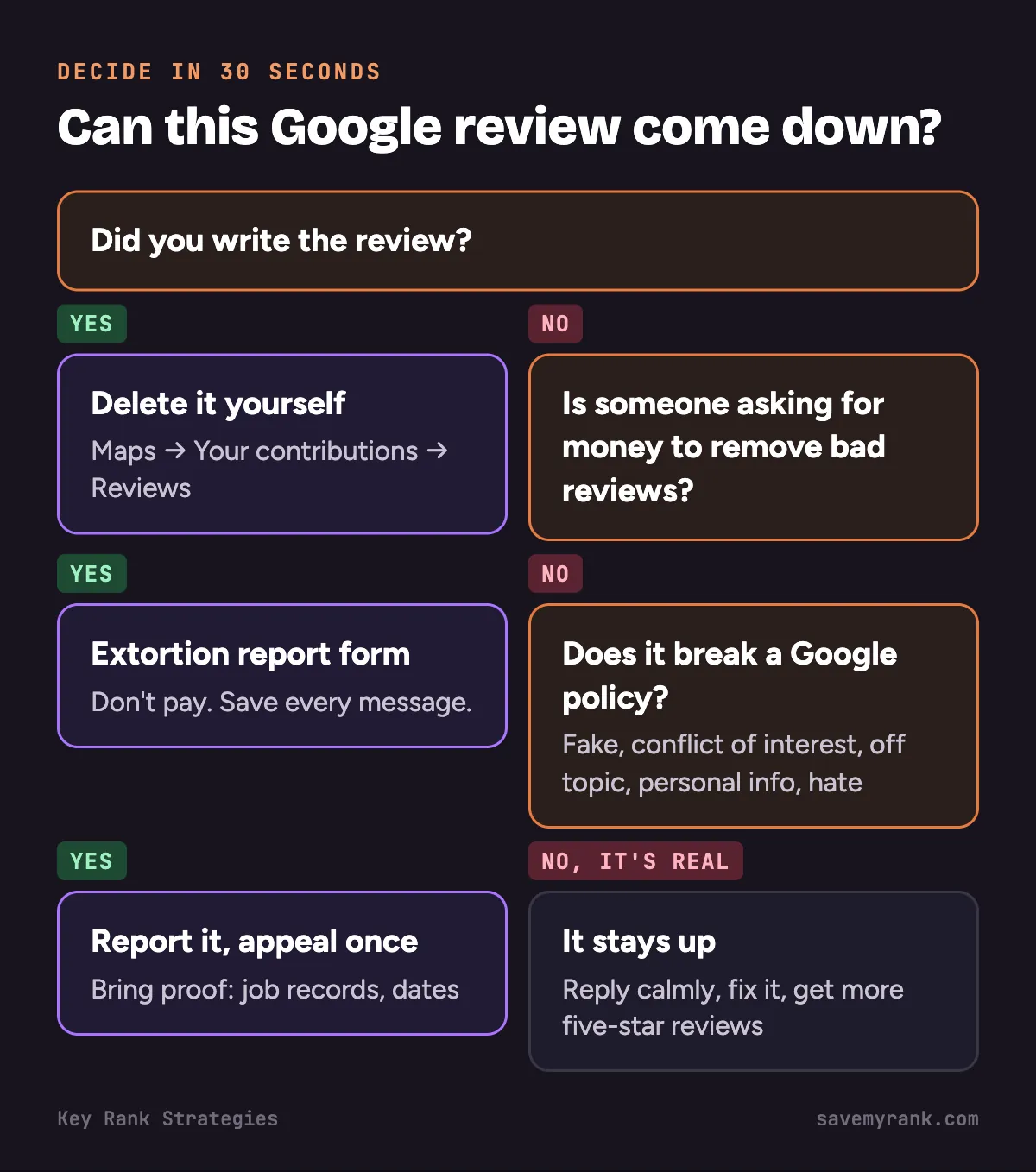
| Your situation | Can it come down? | How |
|---|---|---|
| You wrote the review | Yes | Delete it yourself in Google Maps |
| Review on your business that breaks a Google policy | Yes, if Google agrees | Report it, then appeal once if needed |
| Review that's negative but real | No | Reply to it and get more good reviews |
| Wave of bad reviews plus a demand for money | Google investigates | Use Google's extortion report form |
| Review with false statements about you | Maybe | Report it, and talk to a lawyer |
Google says it won't step into disagreements between businesses and customers. So "I disagree" or "it's unfair" is not a reason it will act on.
How to remove a Google review from your business
Report it from your Business Profile
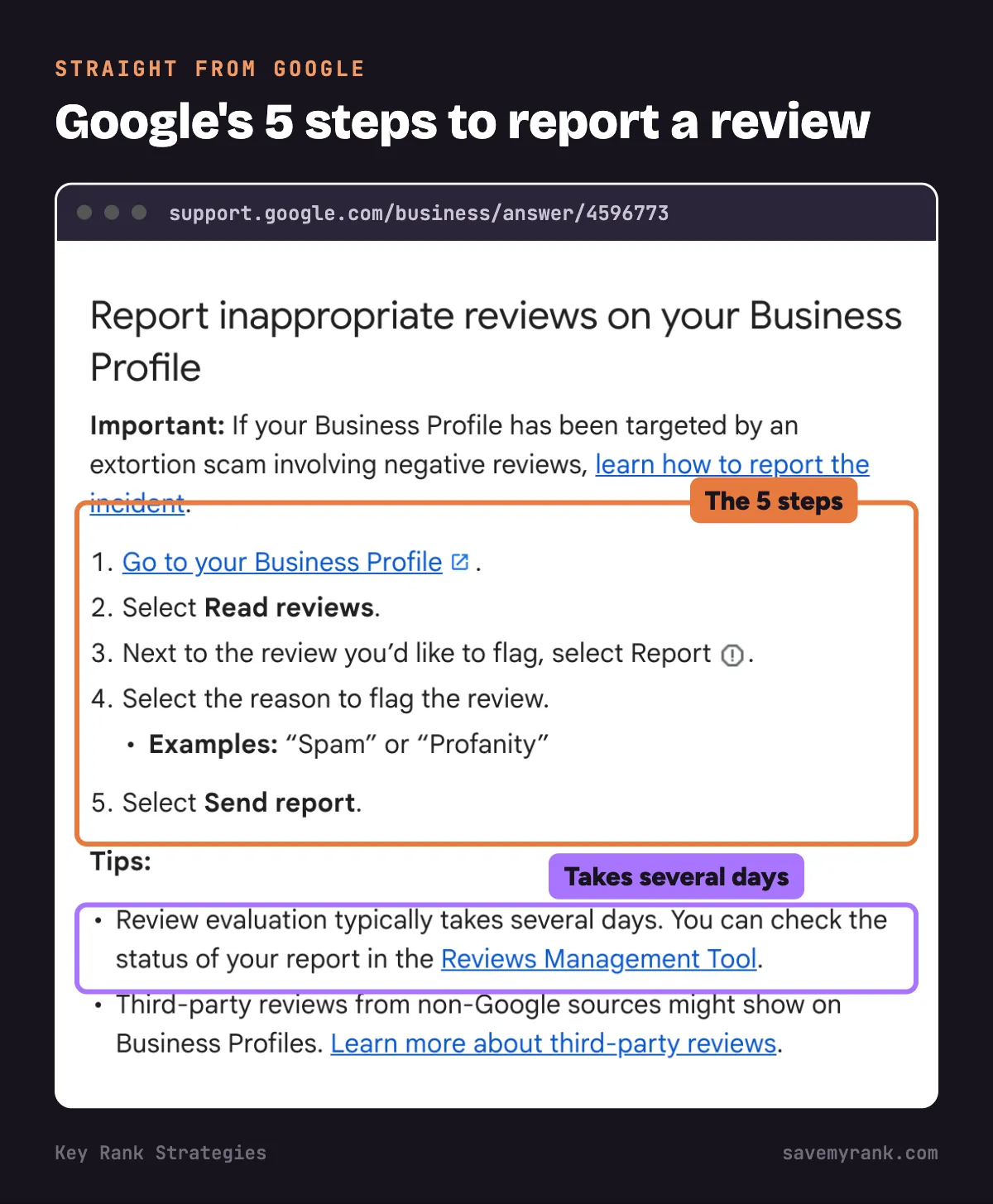
- Go to your Business Profile at business.google.com.
- Click "Read reviews."
- Next to the review, click "Report."
- Pick the reason, like "Spam" or "Off topic."
- Click "Send report."
Google says review checks usually take several days.
Report it with the Reviews Management Tool
- Open Google's Reviews Management Tool.
- Confirm the email for your Business Profile, or switch accounts.
- Pick your business.
- Click "Report a new review for removal."
- Click "Report" next to the review, pick the reason and submit.
Check the status
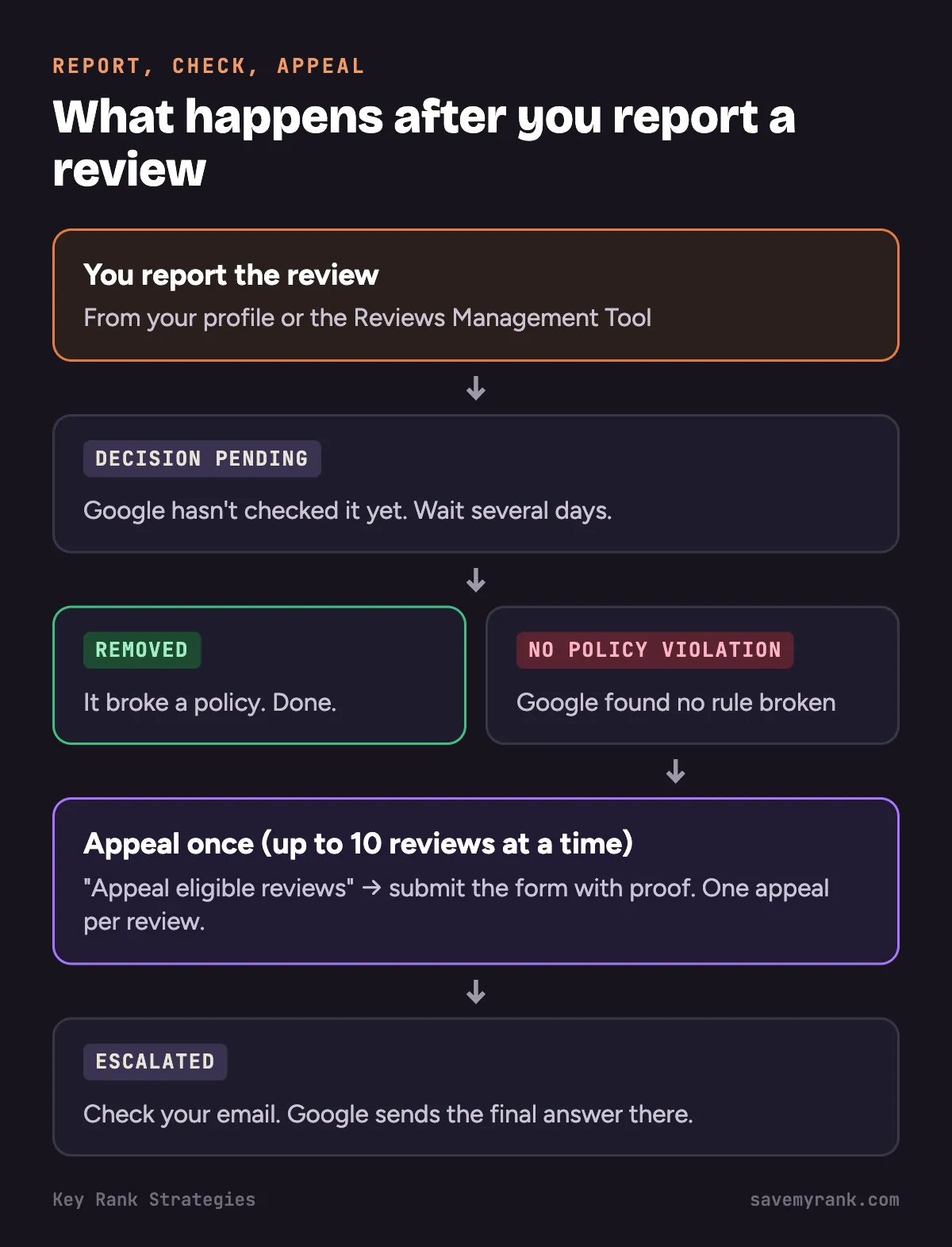
| Status | What it means | What to do |
|---|---|---|
| Decision pending | Google hasn't checked it yet | Wait |
| Report reviewed - no policy violation | Google checked and found no rule broken | Appeal once, if you have proof |
| Escalated - check your email for updates | Your appeal went up a level | Watch your email for the final answer |
Appeal once
- Open the Reviews Management Tool and pick your business.
- Choose "Check the status of a review I reported previously and appeal options."
- At the bottom, click "Appeal eligible reviews."
- Pick the reviews. You can choose up to 10.
- Click "Submit an appeal," fill out the form and submit.
You only get one appeal per review, so make it count. Have this ready:
- A screenshot of the review
- Job records showing no customer by that name, or no job on that date
- The exact Google policy it breaks
- Any proof, like an ex-employee's name or a competitor's link
Sample appeal you can copy:
This review breaks Google's policy on fake engagement. The reviewer is not a customer. We searched our job records from [month] to [month] and found no customer by this name and no job at the address the review describes. The review was posted 2 days after we let an employee go. Please remove it.
Change the details to match your case. Only claim what you can back up.
Which reviews Google will remove
| Policy | What it looks like for a home-service business |
|---|---|
| Fake engagement / spam | A "customer" you never served. Many 1-star reviews in one day from new accounts. |
| Conflict of interest | A review from a competitor or an ex-employee. |
| Off topic | A review meant for a different plumber with a similar name. A rant about politics. |
| Personal information | A review that posts your tech's personal phone number or home address. |
| Harassment, hate or obscene content | Slurs, threats or profanity aimed at you or your staff. |
Fake review on your profile? Our full guide: what to do about a fake Google review.
Which reviews Google won't remove
- A real customer who had a bad experience, even if you think they're wrong.
- A complaint about your price.
- A 1-star rating with no text, from a real customer.
- A review you just don't like.
For these, go to what to do when a bad review stays up.
Review bombing or extortion: the separate report
This is when a wave of 1-star and 2-star reviews hits your profile, then someone asks for money to make them go away.
- Don't pay. Google says paying can bring more attempts and doesn't promise removal.
- Save everything now: screenshots of every message with the date, time and sender.
- Copy links to each fake review.
- Note the dates: when the reviews started and when the demand came.
- Report it on Google's extortion report form.
What to do when a bad review stays up
Reply the right way
- Reply within a day or two.
- Stay calm. Future customers will read your reply, not just the review.
- Say sorry for the experience. Don't argue the details in public.
- Give a name and a number to call.
- Don't share private job details.
Plumber: no-show complaint
Hi [Name], I'm sorry we missed your window. That's not how we want to treat anyone. Please call me directly at [number] so I can make it right. [Owner name], [Business name]
Roofer: leak came back
Hi [Name], I'm sorry the leak came back. Our work should hold up. Please call me at [number] and we'll get someone out to look at it. [Owner name], [Business name]
HVAC: price complaint
Hi [Name], thanks for the feedback. I'm sorry the price was a surprise. We should have gone over it clearly before starting. Please call me at [number] and I'll walk through the bill with you. [Owner name], [Business name]
Ask the customer to update it
- Fix the problem first.
- Then ask, once, if they'd be willing to update their review.
- Don't offer money, discounts or gifts for it.
Bury it with new reviews
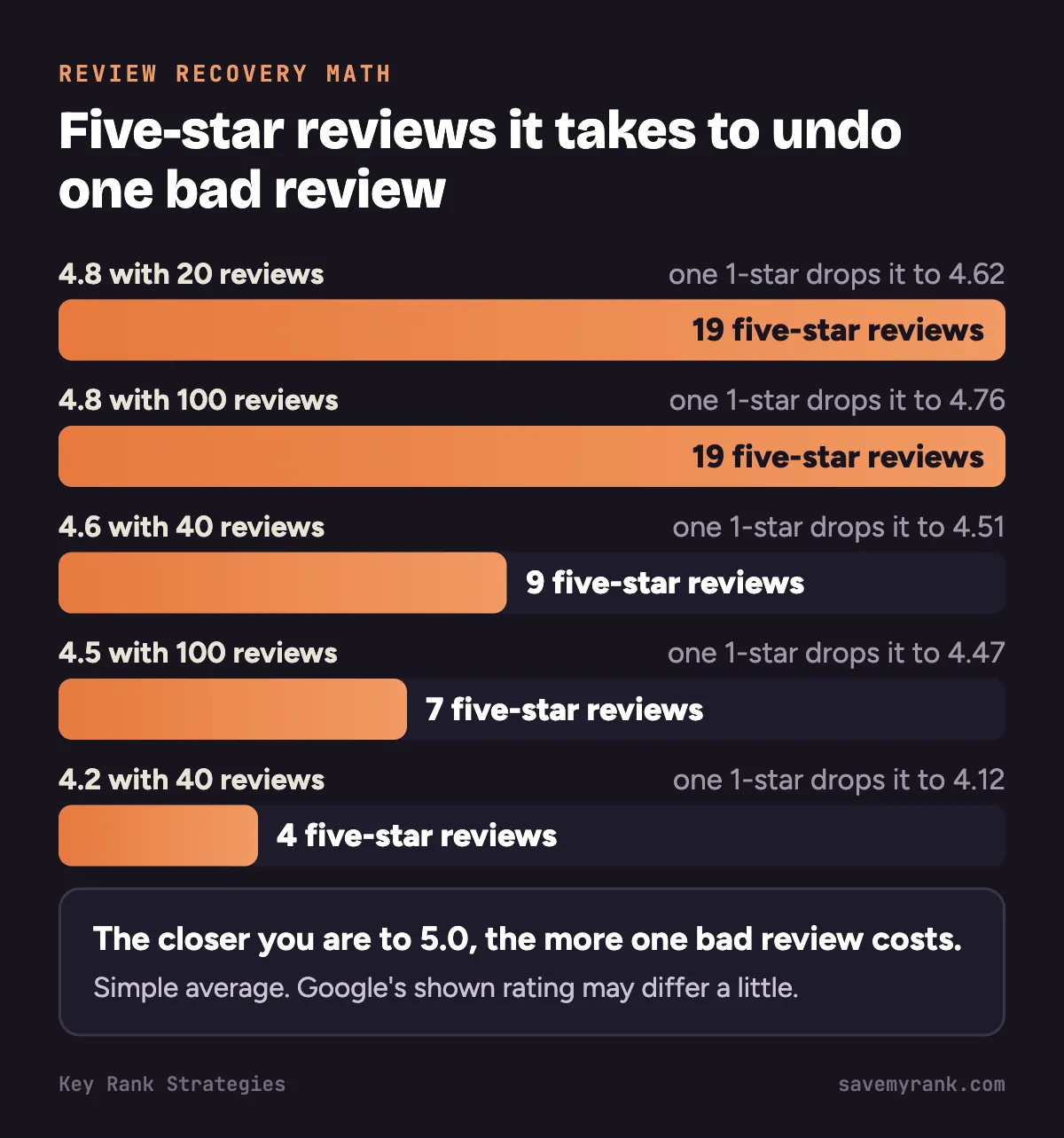
One bad review hurts less when it sits among many good ones. Here's the math with a simple average. Google's shown rating may differ a little.
| Your rating now | After one 1-star | 5-star reviews to get back |
|---|---|---|
| 4.8 with 20 reviews | 4.62 | 19 |
| 4.8 with 100 reviews | 4.76 | 19 |
| 4.6 with 40 reviews | 4.51 | 9 |
| 4.5 with 100 reviews | 4.47 | 7 |
| 4.2 with 40 reviews | 4.12 | 4 |
- The closer you are to 5.0, the more 5-star reviews one bad review costs you.
- More reviews also soften the drop.
- Build a habit: ask after every job. See how to get more Google reviews.
Should you pay a review removal company?
- Nobody can make Google remove a review that follows its rules.
- Reporting a review to Google is free. You can do it yourself with the steps above.
- Sterling Sky, a local SEO agency, wrote about removal companies that used a false copyright (DMCA) claim to get content taken off Google.
- Red flags: "guaranteed removal," "pay only after removal," or no clear answer on how they do it.
- Fake legal claims can come back on you, not just on them.
Is it illegal to leave or delete bad reviews?
This is general info, not legal advice. Talk to a lawyer about your case.
- Leaving a bad review: generally legal when it's an honest opinion or true. Making up false facts about a business can be defamation.
- Gag clauses: the federal Consumer Review Fairness Act bans form contracts that stop customers from posting honest reviews or punish them for it.
- Suppressing reviews: the FTC's rule on consumer reviews took effect October 21, 2024. It bans fake reviews. It also bars businesses from using baseless legal threats, intimidation or certain false accusations to stop or remove a negative review.
- Your own website: the same FTC rule says you can't hide bad reviews on your own site and make it look like you're showing all of them.
Sources: the FTC's guide to the reviews rule and its Consumer Review Fairness Act guide.
How to delete a Google review you wrote
On a computer:
- Open Google Maps and sign in.
- Click the menu, then "Your contributions," then "Reviews."
- Next to the review, click "More."
- Click "Delete review" and follow the steps.
On an iPhone or Android phone:
- Open the Google Maps app.
- Tap "Contribute," then "View your profile."
- Scroll and tap "See all reviews."
- Next to the review, tap "More," then "Delete review."
You can also edit instead of delete. Google then shows the edit date as the review date.
Dealing with a review that shouldn't be there?
We'll look at your reviews and your profile, tell you which ones are worth reporting, and give you a plan to grow good ones. Free. Or call (949) 810-7351.
Get a free review audit →Reviews are a big part of how you rank on Maps. Our Google Business Profile optimization and local SEO services include review requests and replies. Plans start at $1,000 a month.
Based in Orange County? See our Costa Mesa Google Business Profile service.
Frequently asked questions
What is Google's review policy?
Google bans reviews that are fake or spam, off topic, from someone with a conflict of interest like a competitor or ex-employee, offensive, harassing, or that share personal information. Reviews that break these rules can be reported and removed.
How can I see my Google reviews?
Sign in at business.google.com and click Read reviews. Customers can see them by searching your business on Google or Google Maps.
Can an owner delete Google reviews?
No. Owners can report a review, and Google removes it only if it breaks a policy. You can delete reviews you wrote yourself.
How much does it cost to remove a Google review?
Reporting a review to Google is free. Paid services can't make Google remove a review that follows its rules.
Can you actually remove bad Google reviews?
Only if they break a Google policy, or if you wrote them. A real customer's bad review stays up. Reply to it and get more good reviews.
Can you get a Google review removed?
Yes, if it breaks a policy. Report it from your Business Profile or the Reviews Management Tool. If Google says no, you get one appeal for up to 10 reviews.
How many positive reviews does it take to cancel out one negative review?
It depends on your rating. At 4.8 stars it takes about 19 five-star reviews to get back, and at 4.2 stars it takes about 4. See the table above.
Can I delete a review I wrote?
Yes. In Google Maps, go to Your contributions, then Reviews, click More next to the review and choose Delete review.
Can I delete a Google review?
You can delete reviews you wrote. You can't delete reviews other people left on your business, but you can report them.
Is it illegal to leave a bad review on Google?
Generally no, if it's an honest opinion or true. Making up false facts about a business can be defamation. This isn't legal advice.
Is it illegal for a company to delete bad reviews?
A business can't delete Google reviews. Under the FTC's reviews rule, a business can't use baseless legal threats or intimidation to get bad reviews removed, or hide bad reviews on its own site while acting like it shows them all.
Why are so many Google reviews being removed?
Google uses automated spam detection to remove reviews it flags as spam. Google says it sometimes removes real reviews by mistake. If that happens, contact Google support.
How do I leave a Google review?
Open Google Maps, find the business, tap Reviews, then tap the stars and write about your experience.
How can I find someone's Google reviews?
Click the reviewer's name on any of their reviews. Their profile shows the reviews they've posted publicly.
If I delete a Google review, will they know?
Google doesn't say it notifies the business. The review just disappears from the profile, so the owner may notice it's gone.
How long does Google take to remove a review?
Google says review checks usually take several days. Appeals are answered by email.
Can I remove a 1-star review with no text?
Only if it breaks a policy, like it came from someone who was never a customer. A real customer's 1-star rating stays up.