If your business is not showing on Google Maps, you have one of two problems. Either your Business Profile can't show yet (not verified, suspended, edits pending, a duplicate, or no address and no service area), or it shows but ranks too low to be seen. Search your exact business name first to find out which one.
Quick test: which problem do you have?
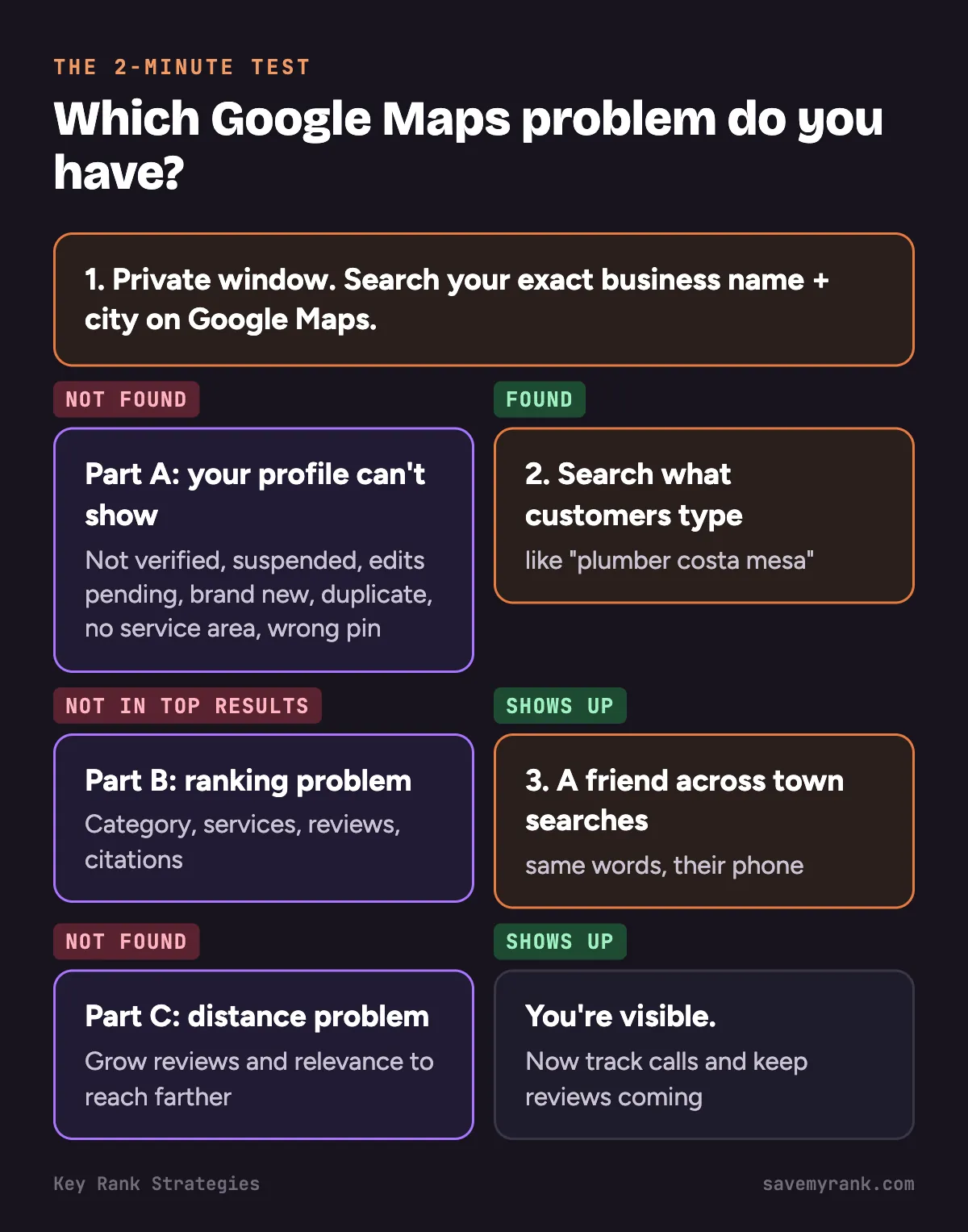
This takes 2 minutes. Do it before you change anything.
- Open a private window. On a computer, use Incognito in Chrome. This keeps your own account from changing what you see.
- Search your exact business name and city on Google Maps. Not there at all? Go to Part A. Your profile can't show.
- Now search what customers type, like "plumber near me" or "roofer Costa Mesa." Your name shows up, but this doesn't? Go to Part B. It's a ranking problem.
- Ask a friend across town to search too. You show up near your shop but not for them? Go to Part C. It's a distance problem.
Why the private window matters: Google ranks map results partly by how close the searcher is. Your phone is usually at or near your business, so you see yourself more easily than a customer 5 miles away does.
Part A. Your profile is not showing at all
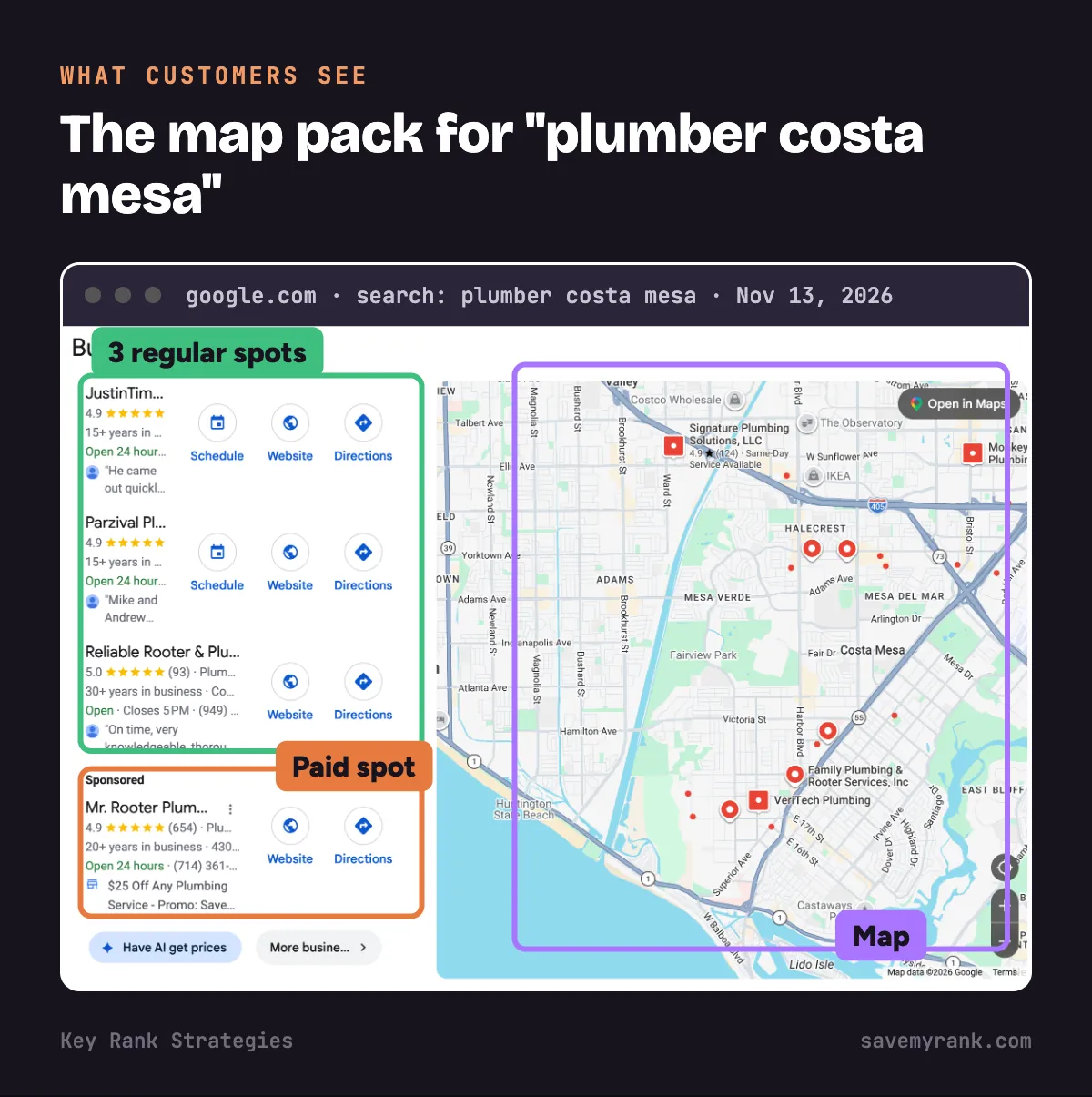
If even your exact name finds nothing, Google is not showing your profile to anyone. Check these 7 things in order.
1. Your profile is not verified
- What you see: a "Get verified" button on your profile.
- Why it matters: Google says a verified business is more likely to show up in search results.
- The fix: sign in at business.google.com, click "Get verified," and finish the method Google gives you. Google's review can take up to 5 business days.
- Stuck? Our Google Business Profile verification guide walks through every method, including video.
2. Your profile is suspended
- What you see: a warning in your profile that it is suspended or restricted. Your profile may vanish from Maps.
- Things that break Google's rules: extra keywords in your business name, a fake or virtual office address, or showing a home address when customers don't come to you.
- The fix: fix the cause first. Then file an appeal with proof, like a business license or a utility bill.
- Full steps: what to do when your Google Business Profile is suspended.
3. Your edits are still pending
- What you see: your change shows as "Pending" in your profile.
- How long: Google says edits usually take up to 10 minutes, but some take up to 30 days.
- The fix: wait. Don't keep changing your name, address or category. Each new edit can restart the review.
4. Your profile is brand new
- A new profile has to be verified before it can show for most searches.
- After you verify, Google reviews it. That can take up to 5 business days.
- New profiles start with no reviews. So even when it's live, you may only show for your exact name at first. That's a Part B problem, not a broken profile.
5. You have a duplicate listing
- How to check: search your business name and your phone number on Google Maps. Two pins for one business means a duplicate.
- Why it hurts: your reviews and calls get split. Google may hide or remove one of the two.
- The fix: keep the one with the most reviews. Ask Google support to remove the other. Don't just delete one yourself if it has reviews you want to keep.
6. You hid your address but never set a service area
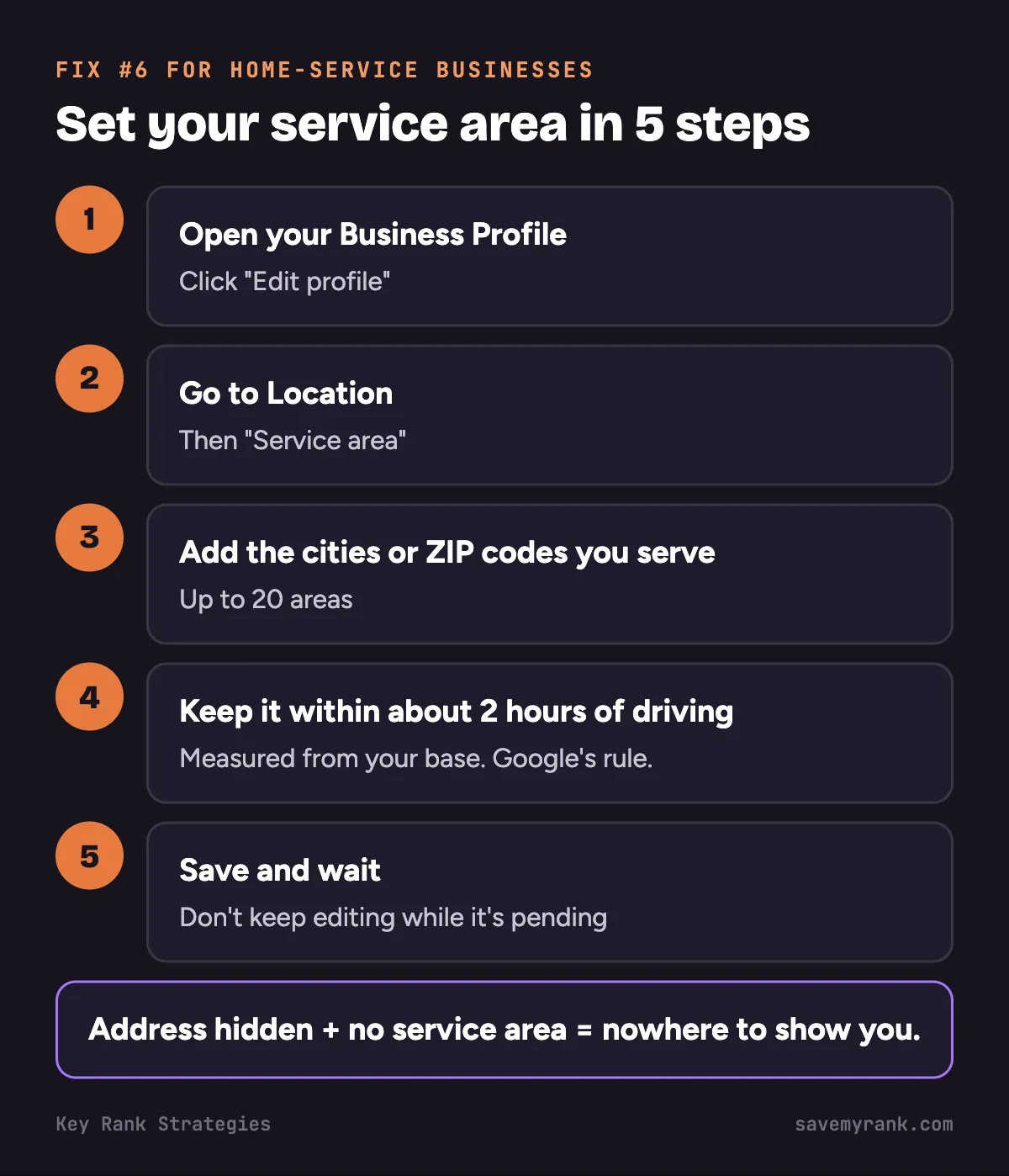
This one hits home-service businesses the most. If you go to the customer (plumber, roofer, HVAC, cleaner), Google says you should not show your address. But then you must tell Google where you work.
- Open your Business Profile and click "Edit profile."
- Go to "Location," then "Service area."
- Add the cities or ZIP codes you serve. Google allows up to 20.
- Keep the whole area within about 2 hours of driving from your base. That's Google's rule.
- Save, then wait for the edit to clear.
More detail in our guide to service-area businesses on Google Maps.
7. You moved, and the address or pin is wrong
- What you see: the pin sits on the wrong street, or the old address still shows.
- The fix: click "Edit profile," then "Location." Fix the address. Drag the pin onto your real door or building.
- Heads up: changing your address can make Google ask you to verify again.
- If calls dropped after a move, read why calls drop after you move your business.
Part B. Your profile shows, but not for the searches that bring calls
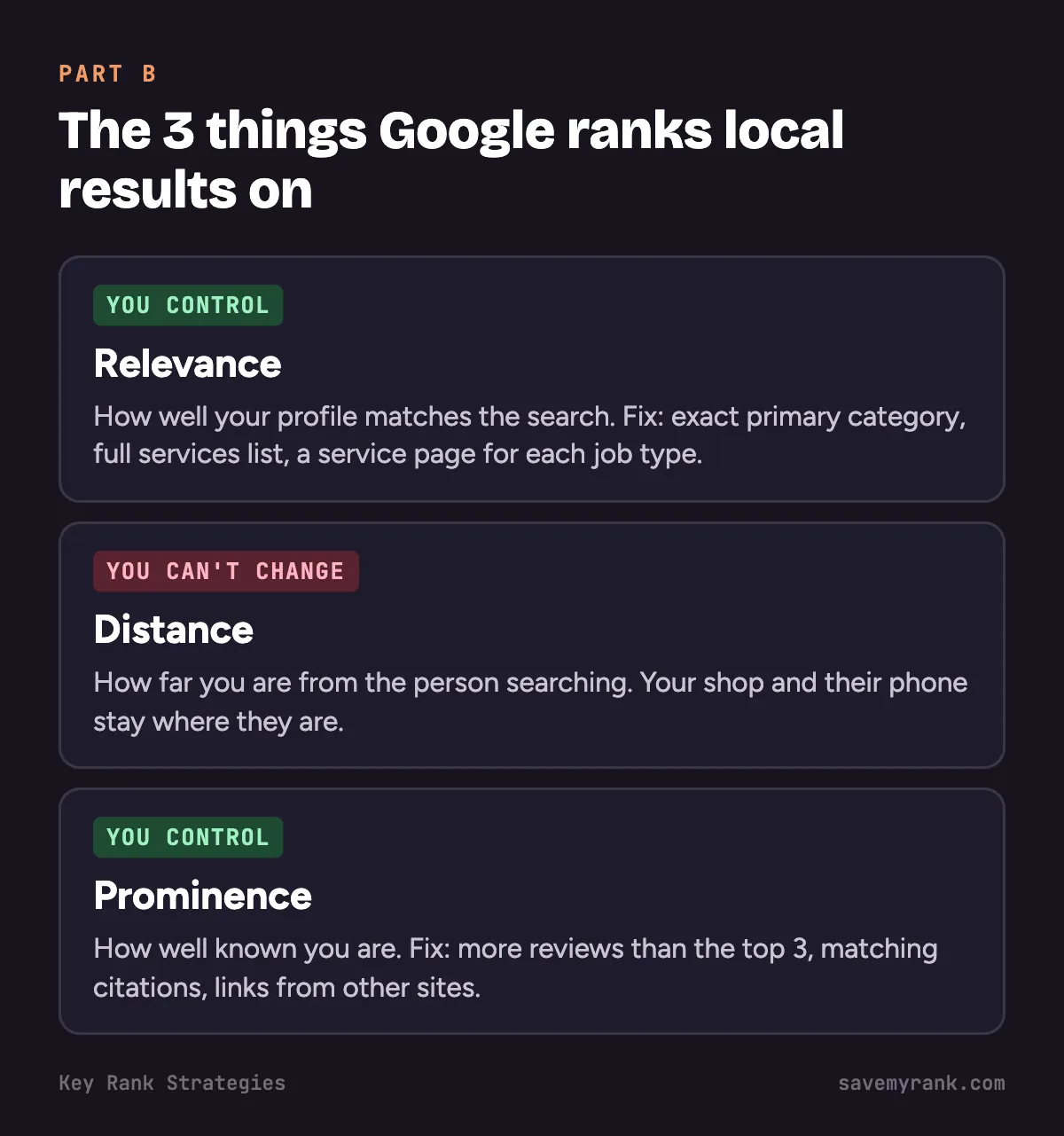
Google says local results are mainly based on 3 things:
- Relevance: how well your profile matches the search.
- Distance: how far you are from the person searching.
- Prominence: how well known you are. Google names reviews and links from other websites as part of this.
You can't move your shop closer to every customer. You can work on relevance and prominence. Here's how.
8. Your main category is wrong
- Your primary category tells Google what you are. It matters a lot.
- Pick the most exact one. "Roofing contractor" beats "Contractor." "Plumber" beats "Home services."
- Add extra categories only for work you really do, like "Water heater installation service."
9. Your profile doesn't say what you do
- Fill in your services list. Use the words customers use, like "drain cleaning" and "water heater repair."
- Write a short, plain description of your work and the cities you serve.
- Give each main service its own page on your website. Link your profile to your site.
- Don't stuff keywords into your business name. It breaks Google's rules and can get you suspended.
10. You have fewer reviews than the top 3
- Google says more reviews and good ratings can help your local ranking.
- Look at the 3 businesses above you. Count their reviews. That's your target.
- Ask every happy customer, every time. Send a text with your review link right after the job.
- Reply to every review, good or bad.
- Our guide to getting more Google reviews has the full system.
11. Your name, address and phone don't match across the web
- Your business shows up on Yelp, Facebook, Angi, BBB and many other sites. These listings are called citations.
- If one says "Suite 4" and another says "#4," that's fine. A different phone number or an old address is not.
- Fix the big sites first. Then work down the list.
- Here's how: citations for local SEO.
Part C. Why you show up near your shop but not across town
Here's how it looks: you rank #1 in your own neighborhood, but a customer 5 miles away can't find you.
- Why it happens: distance is part of how Google ranks. A customer sees businesses close to them first.
- What you can't change: where your business is and where the customer is standing.
- What you can change: relevance and prominence. More reviews, a better category, city pages on your website, and matching citations all help you reach farther.
- How to see it: a grid check searches from many points across your area and shows your rank at each one. See how to check your Google Maps ranking.
Want us to run that grid check for you? Our free audit includes it.
How long each fix takes to show up
| Fix | How long | Source |
|---|---|---|
| Verification review | Up to 5 business days | |
| Postcard code arriving | Most arrive within 14 days | |
| Profile edits (category, hours, service area) | Usually 10 minutes, up to 30 days | |
| Video verification review | Up to 5 business days | |
| More reviews, fixed citations | No set time. It builds over weeks and months. | Our experience |
How to contact Google Business Profile support
- Sign in to the Google account that owns your profile.
- Go to support.google.com/business/gethelp.
- Pick your business and the problem you have.
- Follow the options Google shows. Which ones you get (form, email or chat) depends on the problem.
Have these ready before you start:
- Your business name, address, phone number and website, exactly as they appear on your profile
- A link to your profile
- Screenshots of the problem
- Proof you run the business: a business license, a utility bill or an invoice in the business name
Is it Google Maps or your website?
Your map listing and your website are two different things. Your website can be missing from regular Google results even when your profile is fine.
- Test: search
site:yourwebsite.comon Google. No results means Google hasn't added your site to its index. - Check: set up Google Search Console (it's free) and look at the "Pages" report.
- Common cause: a "noindex" setting left on after a website rebuild. Ask your web person to check.
- Need a deeper look? Here's how a local SEO audit works.
Checklist: 15 things to check before you call anyone
- Your profile says "Verified."
- No suspension warning in your profile.
- No edits stuck on "Pending."
- Only one listing for your business on Maps.
- Your business name matches your sign, truck and invoices. No extra keywords.
- Address shown only if customers come to you.
- Service area set, if you go to customers.
- The pin sits on your real building.
- Your primary category is the most exact one.
- Your services list is filled in.
- Your hours are right.
- Your phone number works and someone answers it.
- Your website link works and the page loads on a phone.
- Your review count is close to the top 3 in your area.
- Your name, address and phone match on Yelp, Facebook and other big sites.
Not sure which problem you have?
We'll check your Google Business Profile, run a map ranking check across your service area, and send you a plain fix list. Free. Or call (949) 810-7351 to talk to our Orange County SEO team.
Get a free Google Maps audit →If you'd rather have someone fix it for you, our local SEO services cover the profile, reviews, citations and ranking checks. Plans start at $1,000 a month. We also do Google Business Profile management in Costa Mesa, and we work with plumbers, HVAC companies and roofers across Orange County.
Google's own help pages
Want it straight from Google? These are the official pages behind the steps above:
- Tips to improve your local ranking on Google: what Google says decides who shows up first.
- Manage your service areas: how to set your service area if customers don't come to you.
- Verify your business on Google: every way to get your profile verified.
- What happens to your profile edits: why an edit can sit in review for days.
Frequently asked questions
How do I get my business to come up on Google Maps?
Create or claim your Business Profile at business.google.com and verify it. Fill in your category, services, hours and service area. Then get reviews from real customers.
How long does it take for a business to appear on Google Maps?
After you verify, Google's review takes up to 5 business days, and a postcard code can take up to 14 days to arrive first. Showing for searches like "plumber near me" takes longer and depends on reviews and competition.
Why is my business not appearing in Google Maps?
Run the quick test at the top of this page. If your exact name finds nothing, your profile is unverified, suspended, pending, a duplicate, or missing a service area. If your name works but other searches don't, it's a ranking problem.
Why don't all businesses show up on Google Maps?
Google only shows businesses that have a profile and meet its rules. Online-only businesses can't have a profile. For each search, Google also picks the results it thinks are closest and best matched, so many real businesses don't show for a given search.
How do I make Google Maps not show my business?
If you own the business and closed it, mark it as permanently closed in your Business Profile. You can't hide a real, open business from Maps, and other people can't remove it for you either.
Why has my business page disappeared from Google?
The usual causes are a suspension, an edit Google is still reviewing, a duplicate listing, or a change to your name, address or category that set off a new review. Check your profile for a warning first.
Why would a Google Business Profile disappear?
Google can pull a profile that breaks its rules, like a keyword-stuffed name or a virtual office address. Big edits, like a new address, can also send it back to review. Fix the cause, then appeal or verify again.
How can I see my business on Google?
Sign in to the Google account that manages your profile and search "my business" or your business name and city. To see what customers see, search in a private window while signed out.
Why is my business location wrong on Google Maps?
The address was typed wrong, the pin was placed wrong, or you moved and didn't update the profile. Someone else may also have suggested an edit that Google accepted.
How do I fix Google Maps showing a wrong location?
In your Business Profile, click Edit profile, then Location. Fix the address, drag the pin onto your real building and save. Google may ask you to verify again.
Why is my Facebook business page not showing up in Google Search?
Google decides which pages to show, and a Facebook page often ranks only for your exact name. Make sure the page is public and uses your exact business name. It won't put you on Google Maps, but your Business Profile will.
How do I get my business to show up on Google Search?
You need two things. A verified Business Profile puts you on Maps and the map box in Search, and a website that Google has indexed puts you in the regular results. Check both with the steps on this page.
Why is my listing not showing up on Google?
Start with your exact business name in a private window. No result means a profile problem (Part A). A result for your name but not your services means a ranking problem (Part B).
Why is my business not appearing in Google searches?
If your website is missing, search site:yourwebsite.com. No results means Google hasn't indexed it, often because of a noindex setting left on after a rebuild. If it's your map listing, use the quick test above.
How long does it take for my business to show up on Google?
A verified profile can show for your name within days. Your website can take days to weeks to be indexed. Ranking for service searches in a busy area like Orange County takes months of steady work.
Why does my business show when I'm logged in but not logged out?
When you're logged in, Google shows you the profile you manage, and your phone is near your shop. Customers don't get either one. Check in a private window, and use a grid check to see other parts of town.
Why did my business disappear after I verified it?
Edits right after verifying, like a new name or category, can send the profile back to review. It can also be a duplicate or a suspension. Look for a warning or a Pending edit in your profile.
Why did my business disappear from Google Maps after I moved?
A new address often sets off a new review, and Google may ask you to verify again. Until that clears, your profile may not show. Check that the pin is on your new building and finish any verification Google asks for.