Google Maps ads are paid spots that put your business at the top of Google Maps. Google lists 4 types: promoted pins on the map, map search ads in the results list, map suggest ads as people type, and placesheet ads on other business pages. To run any of them, link a verified Business Profile to Google Ads.
What are Google Maps ads?
They are ads that show inside Google Maps. They look like normal listings, but they carry a "Sponsored" or "Ad" label.
- Where they show: on the map itself, at the top of the Maps results list, in the search box as people type, and on other business pages.
- What you need first: a verified Google Business Profile linked to your Google Ads account. Google calls this turning on "location assets."
- Who they help: any business with a location or a service area. That includes plumbers, roofers and HVAC companies that go to the customer.
The 4 types of Google Maps ads
This comes straight from Google Ads Help, checked November 13, 2026.
| Ad type | Where it shows | Campaign types that can run it |
|---|---|---|
| Promoted pins | Square pins on the map, along routes in Directions, and sometimes during driving | Demand Gen, Performance Max for store goals, Smart, Travel (Things to do) |
| Map search ads | Top of the Maps results list after someone searches | Search, Performance Max for store goals, Smart, Shopping |
| Map suggest ads | As a suggestion while someone types in the search box (Maps phone app only) | Search, Performance Max for store goals, Smart |
| Placesheet ads | On the details page of another place, like a hotel booking box | Travel, Performance Max for store goals |
Promoted pins
- Square pins. Normal pins are round, so these stand out.
- They can show when someone browses the map, makes a search, follows directions, or drives with navigation on.
- Google added Maps as a channel you can pick inside Demand Gen campaigns. Its 2026 announcement names promoted pins in Browse and Directions modes.
Map search ads
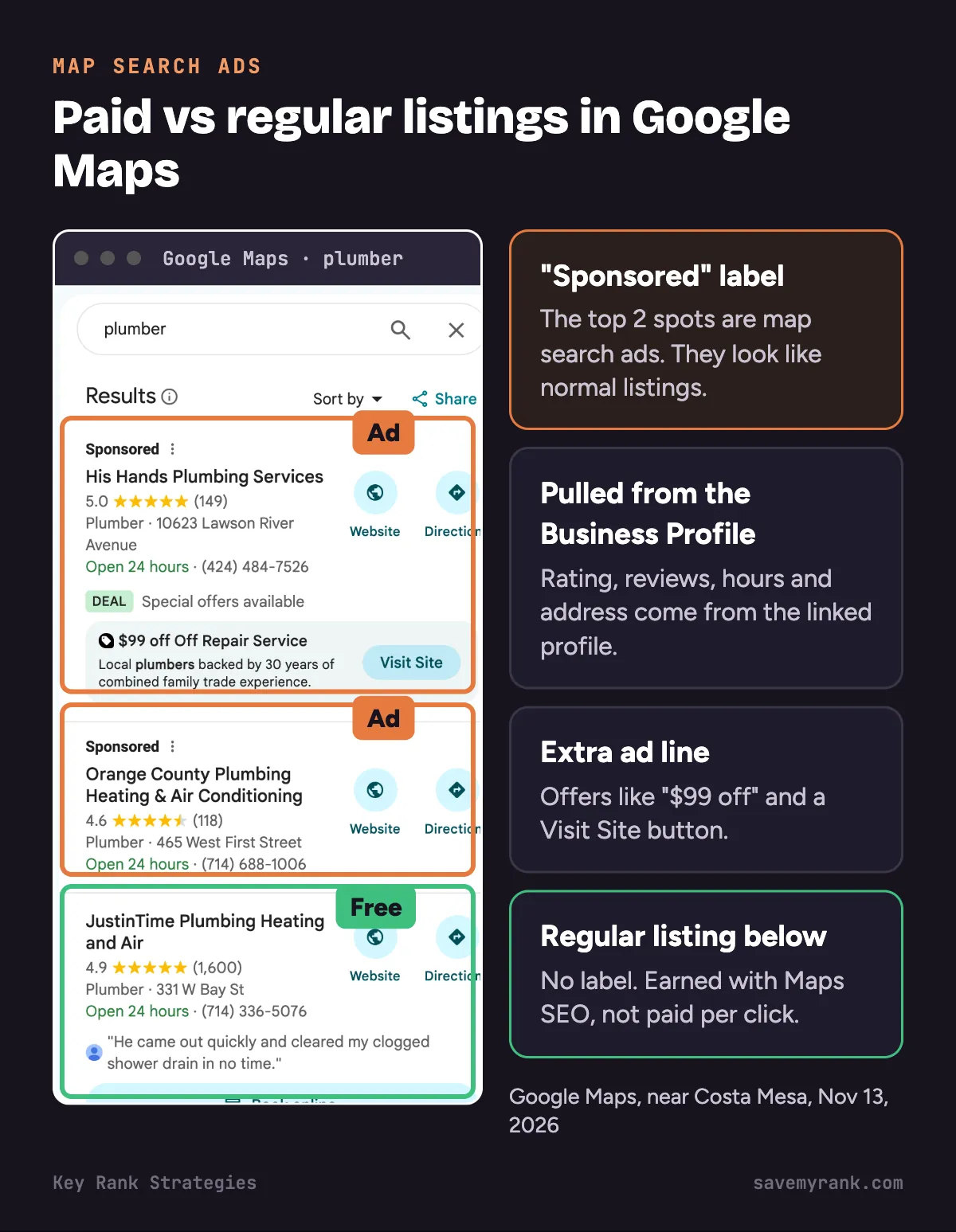
- Your listing sits at the top of the results when someone searches, like "water heater repair."
- For home-service businesses, this is the one to start with. It shows to people who are searching for your service right now.
- A normal Search campaign with your Business Profile linked can run it.
Map suggest ads
- Your business shows as a suggestion while someone types.
- These only show in the Google Maps phone app.
Placesheet ads
- These show on another place's details page. Think hotel booking boxes or tours.
- They rarely fit a home-service business.
Where do Local Services Ads fit?
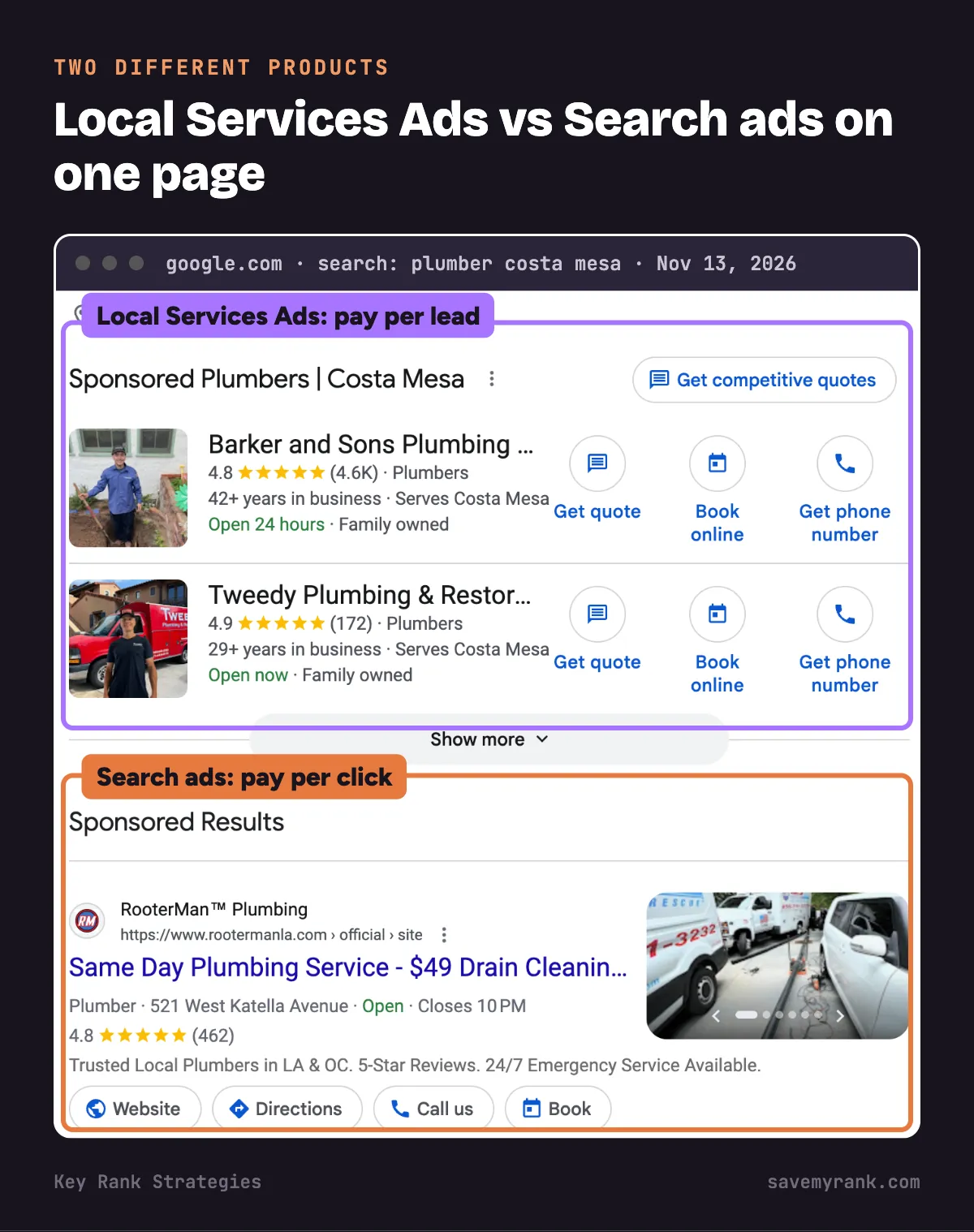
- Local Services Ads (LSA) are a separate Google product. You pay per lead, not per click.
- Google describes them as placement at the top of Google Search for local searches. They are not one of the 4 Maps ad types above.
- They come with the Google Verified badge after Google checks your business.
- Plumbers, HVAC, roofers, electricians, cleaners, pest control and many more trades are eligible.
- More here: Local Services Ads management and Local Services Ads vs Google Ads.
How much do Google Maps ads cost?
There is no set price. It's an auction, and with a Search ad you pay when someone calls, asks for directions or visits your website. Google says swiping through your photos is not charged.
Here's what Google's own Keyword Planner estimates for home-service searches in the Los Angeles TV market, which includes Orange County. We pulled these on November 13, 2026.
| Search | Estimated cost per click | Top-of-page bid range |
|---|---|---|
| emergency plumber | $94 | $36 to $144 |
| garage door repair near me | $75 | $22 to $118 |
| water heater repair | $62 | $32 to $98 |
| plumber near me | $56 | $32 to $117 |
| pest control near me | $48 | $11 to $52 |
| ac repair near me | $41 | $17 to $75 |
| roof repair near me | $40 | $17 to $78 |
| hvac repair near me | $37 | $23 to $94 |
| roofer near me | $28 | $18 to $70 |
| electrician near me | $19 | $10 to $38 |
| landscaping near me | $11 | $5 to $30 |
| house cleaning near me | $10 | $4 to $16 |
These are estimates for Search clicks. Your real cost depends on your bids, your ad and your competition.
How to turn cost per click into cost per call
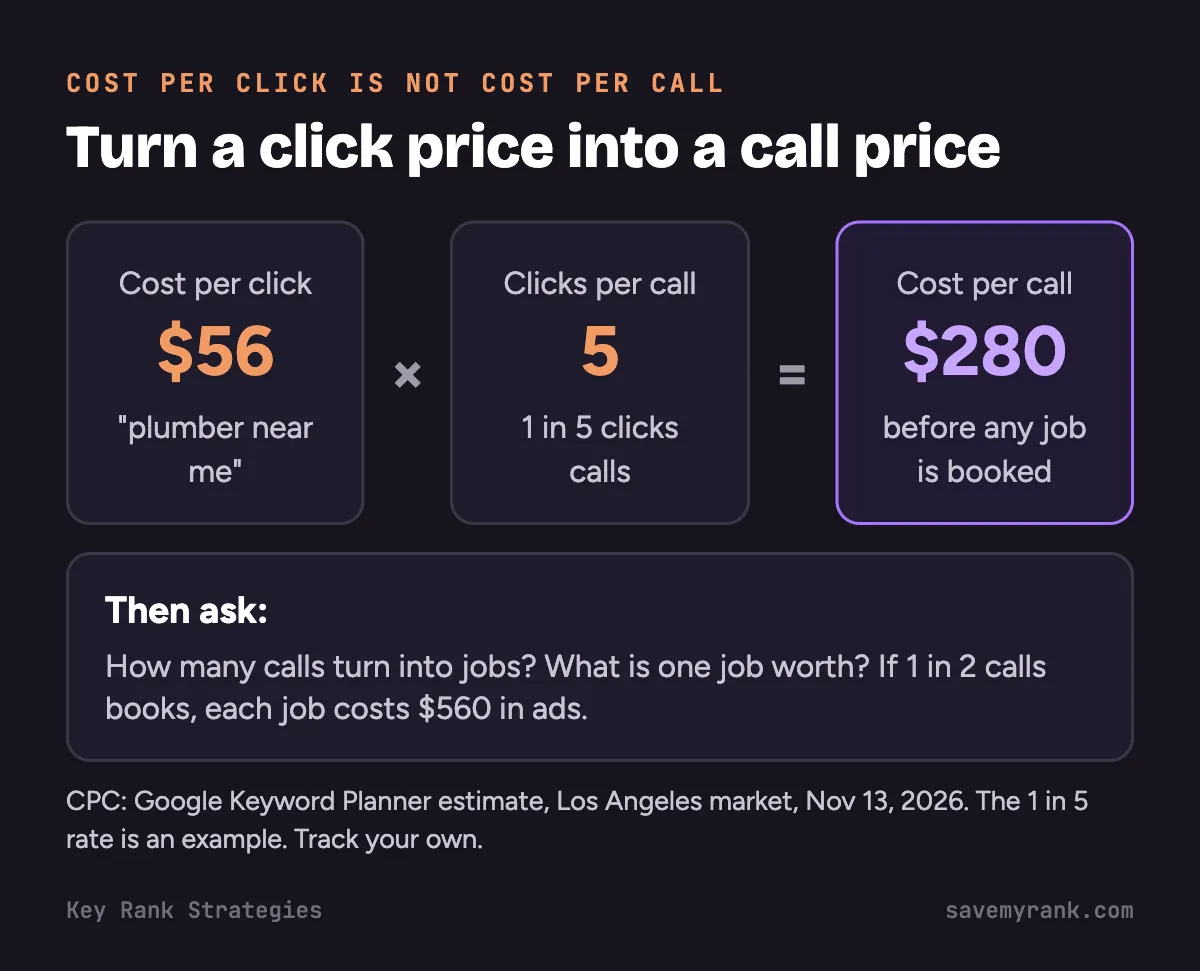
- Take your cost per click. Say $56 for "plumber near me."
- Figure out how many clicks turn into calls. Say 1 in 5. (Your number will be different. Track it.)
- Multiply: $56 × 5 = $280 per call.
- Then ask: how many calls turn into jobs, and what's a job worth?
What Local Services Ads cost
- LSA charges per lead, not per click.
- SearchLight's February 2026 data from 888 contractors put the average at $53 a lead across home services. HVAC was $51. Plumbing was $57.
- Full trade-by-trade numbers: Local Services Ads cost per lead.
How Google bills your budget
- You set an average daily budget.
- On a busy day, Google can spend up to 2 times that amount.
- Over a month, you won't pay more than 30.4 times your daily budget.
- Example: $50 a day means up to $100 on one day, and no more than $1,520 for the month.
How to advertise on Google Maps: step by step
1. Verify and clean up your Business Profile
- Your ad pulls your name, rating, hours and photos from your profile. A weak profile makes a weak ad.
- Not verified yet? Start with our Google Business Profile verification guide.
- Check your primary category, hours, services and photos.
2. Link your Business Profile to Google Ads
- In Google Ads, go to Assets and add a location asset.
- Pick your Business Profile from the list. Use the same Google account that manages the profile.
- Wait for the location asset to show as approved.
Google calls approved location assets "the primary requirement" for Maps ads.
3. Pick the campaign type
- Search campaign: best start for most home-service businesses. It can show your ad in Maps results when people search for your service.
- Demand Gen with the Maps channel: shows promoted pins to people browsing the map. Good for staying in front of people, not for emergency calls.
- Performance Max for store goals: built for businesses that want store visits. It's the campaign Google lists for Waze ads (US only).
- Local Services Ads: pay per lead, separate from these. Often the best fit for trades.
4. Set your area tight
- Target the cities or ZIP codes you really serve.
- Don't target all of Southern California if you only work in central Orange County.
- Google suggests targeting near your business and bidding more for people close by.
5. Track calls without counting them twice
- In your Business Profile, go to Business Profile settings, then Advanced settings.
- Add a "Google Ads phone number." Google uses it in your ad's location asset instead of your normal profile number.
- Use a separate tracking number there. Now ad calls and free profile calls show up apart.
- In Google Ads, turn on call tracking so calls count as conversions.
6. Check results after 2 weeks
- In Google Ads, segment clicks by "Click type." Google splits Maps clicks into location details, directions and calls.
- Count real calls and booked jobs, not just clicks.
- Work out your cost per booked job. Cut searches that cost money and bring no calls.
Can you run ads only on Google Maps?
- Google Ads Help says no. Campaigns that serve on Maps can also serve on other Google surfaces.
- Demand Gen campaigns let you choose which channels to use, and Maps is one of them.
- Google notes Maps in Demand Gen only serves when your account has a location asset turned on.
Why can't I see my Google Maps ad?
Google lists these common reasons. Check them in order.
- Location setup: is your Business Profile verified and linked, and is the location asset approved?
- Campaign status: is the campaign on, and is it targeting the area where you're searching?
- Zoom: promoted pins don't show when the map is zoomed out.
- Search terms: does your search match your keywords?
- Competition: there are only a few ad spots. Another ad may be in yours.
Tip: don't keep searching for your own ad. Use the Ad preview tool inside Google Ads instead.
Google Maps ads vs Google Maps SEO vs Local Services Ads
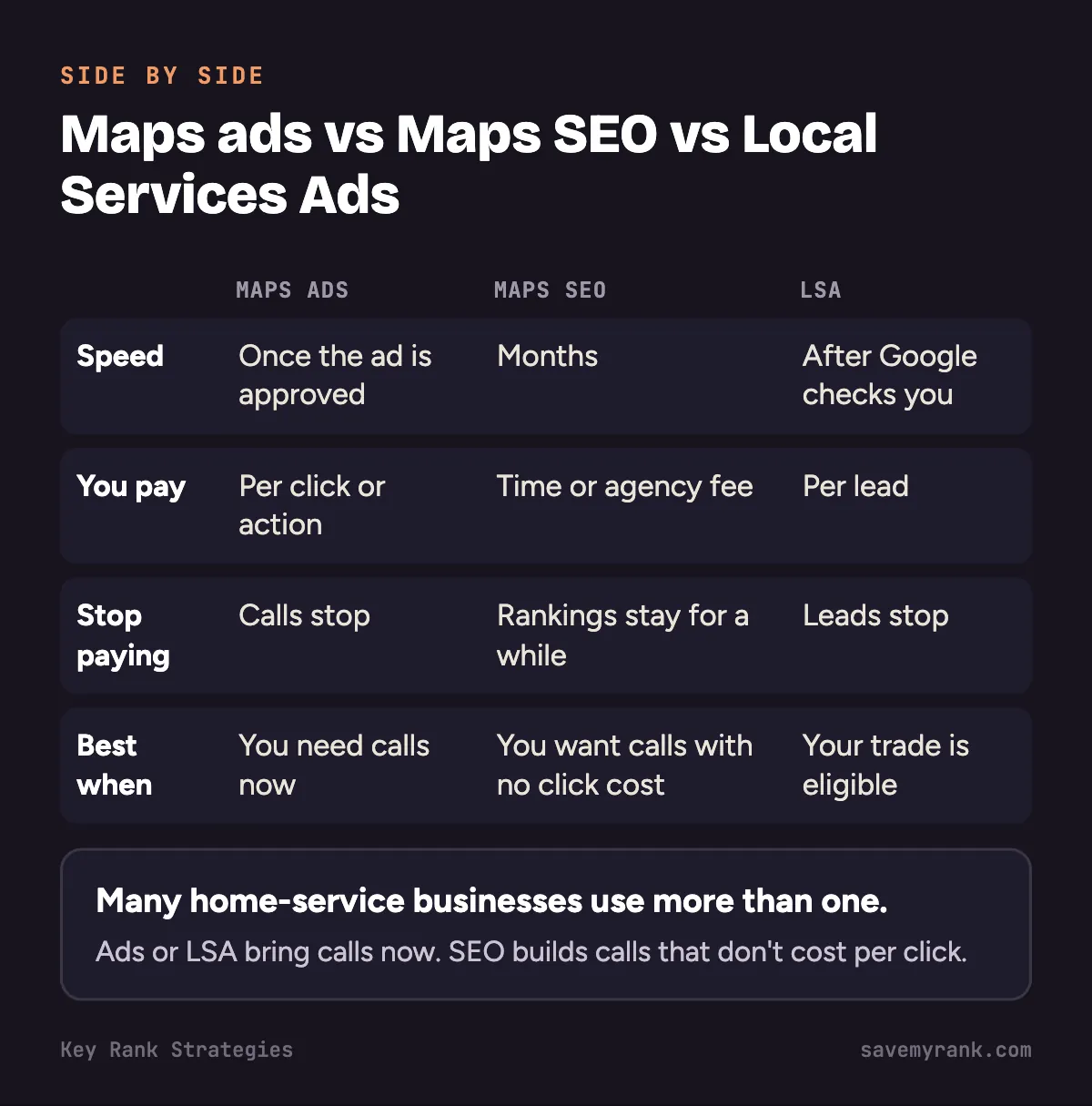
| Maps ads | Maps SEO | Local Services Ads | |
|---|---|---|---|
| How fast | As soon as the ad is approved | Months | After Google checks your business |
| How you pay | Per click or action | Your time or an agency fee | Per lead |
| When you stop paying | Calls stop | Rankings don't switch off the day you stop | Leads stop |
| Best when | You need calls now, or you rank low | You want calls that don't cost per click | Your trade is eligible and you want to pay per lead |
Many home-service businesses use more than one. Read SEO vs Google Ads for local businesses, or see how our Google Maps SEO work is set up.
Competitor ads showing on your business name? What to do
- Check: search your exact business name on Google Maps in a private window. Look for "Sponsored" listings above you.
- The rule: competitors can usually bid on your business name as a keyword.
- Your trademark: if they put your registered trademark in their ad text, you can file a trademark complaint with Google.
- Protect yourself: run a small campaign on your own name, so your own ad can take the top spot when people search for you.
- Keep your profile strong: good photos, fresh reviews, correct hours.
Can you turn off ads on Google Maps?
- This is for Maps users, not advertisers.
- We don't know of a Google setting that turns off ads in Maps.
- Ads are labeled "Sponsored" or "Ad," so you can spot and skip them.
Checklist before you launch
- Business Profile verified
- Primary category is the most exact one
- At least a handful of recent reviews
- Google Ads phone number set in your profile
- Location asset linked and approved
- Area set to the cities or ZIP codes you serve
- Negative keywords added, like "jobs" and "salary"
- Call tracking turned on
- A landing page with a tap-to-call button
- A weekly check on calls and booked jobs
Want to know if Maps ads make sense for you?
We'll look at your Business Profile, your map rankings and what your competitors run, then tell you plainly whether ads, SEO or Local Services Ads fit best. Free. Or call (949) 810-7351.
Get a free audit →If you want it done for you, see our Google Ads management and Local Services Ads management. We also run Google Ads management in Costa Mesa for home-service businesses across Orange County. Plans start at $1,000 a month.
Google's own help pages
Want it straight from Google? These are the official pages behind the steps above:
- About advertising in Google Maps: Google's own overview of every ad type on Maps.
- Show local search ads on Google Maps: how to turn on the location setting so your ads show on Maps.
- About Local Ads: how ads with your address and directions work.
- About your average daily budget: why Google can spend up to 2 times your daily budget on some days.
Frequently asked questions
How do I advertise my business on Google Maps?
Verify your Google Business Profile, then link it to Google Ads as a location asset. Run a Search campaign for your services so your ad can show at the top of Maps results. Demand Gen with the Maps channel adds promoted pins.
How much do Google Maps ads cost per month?
You set the budget. Google won't bill more than 30.4 times your average daily budget in a month. For home-service searches in the LA and Orange County area, Google estimates clicks from about $10 to $94, depending on the trade.
Is $10 a day good for Google Ads?
For most home-service searches in Orange County, it's too low for a Search campaign. Google estimates about $56 per click for "plumber near me" here, so $10 a day buys less than one click. It can work for cheaper trades like house cleaning, or for testing.
Are Google Maps ads worth it for a small business?
They can be, if you track calls and booked jobs. Work out your cost per booked job and compare it with what a job earns you. If you can't track calls, fix that before you spend.
Can you run ads only on Google Maps?
Google Ads Help says you can't serve ads only on Maps. Demand Gen campaigns let you pick Maps as one of your channels.
Is Google Maps monetized?
Yes. Google sells ads in Maps: promoted pins, map search ads, map suggest ads and placesheet ads.
How do I advertise on Google for free?
Your Google Business Profile is free. Verify it, fill it out, add photos and get reviews. It can show on Maps and in the map box on Google Search without paying for clicks.
Why did Google Ads charge me $500?
Google charges you when your costs reach your payment threshold, and on the first day of each month. You can be charged more than once a month. Your budget can also spend up to 2 times your daily amount on busy days.
How do I create a Google Business account?
Sign in with a Google account at business.google.com, add or claim your business, then verify it. Our verification guide covers each step.
Can I get paid to contribute to Google Maps?
No. Google says it doesn't pay people to add reviews. Local Guides earn points and badges, not money.
Who is Google Maps' biggest competitor?
Apple Maps is the other big map app, since it comes built into iPhones. Waze is also owned by Google.
Can I use Google Maps images for commercial use?
Sometimes. Google has rules for using Maps images, and you usually have to keep Google's attribution showing. Read Google's Maps and Earth guidelines before you use one in an ad.
Why can't I see my Google Maps ads?
Check that your Business Profile is linked and the location asset is approved, the campaign is on and targets your area, and you're zoomed in for pins. Your search must match your keywords, and another ad may have won the spot.
How do I turn off ads on Google Maps?
We don't know of a Google setting that turns off Maps ads. They're labeled Sponsored or Ad, so you can skip them.