Most Local Services Ads suspensions come from a short list of problems: an expired license or insurance, a name that doesn't match, workers who skipped the background check, leads passed to someone else, or billing trouble. Each one breaks a rule Google publishes. Each one has a fix.
To avoid a Local Services Ads suspension: keep your license and insurance current and in the same name you advertise with, run every field worker through the background check, only list job types and areas your license covers, never pass leads to another company, don't game lead credits, keep one account, and avoid chargebacks. Answer every re-verification request from Google.
How to use this list
- Each mistake has three parts: what it is, how to spot it, and the fix.
- The rules come from Google's Local Services Ads requirements and its screening and verification process.
- What Google checks depends on your trade and state. Your Local Services dashboard shows what applies to you.
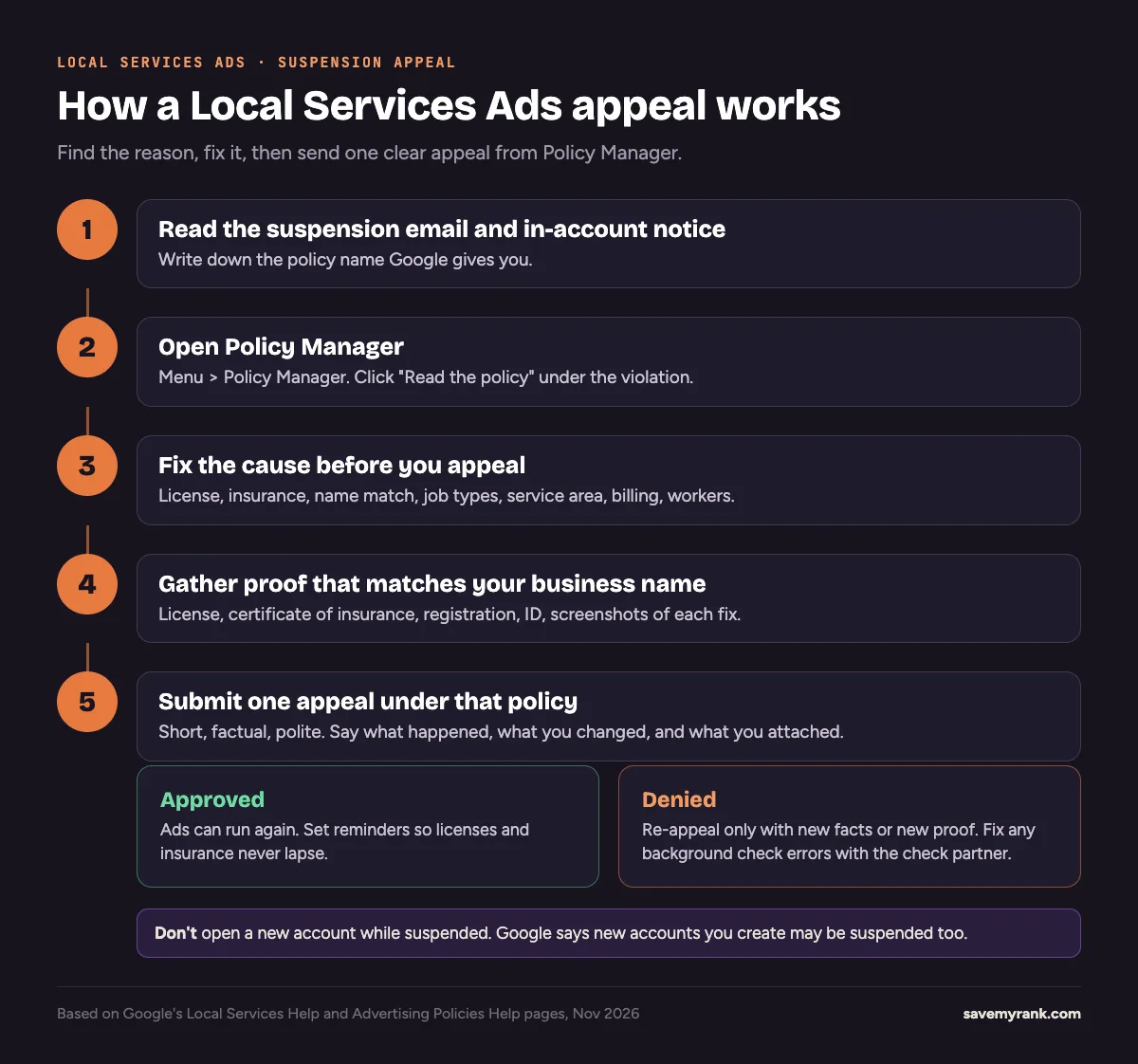
- Already suspended? Go to how to appeal a Local Services Ads suspension.
License and insurance mistakes
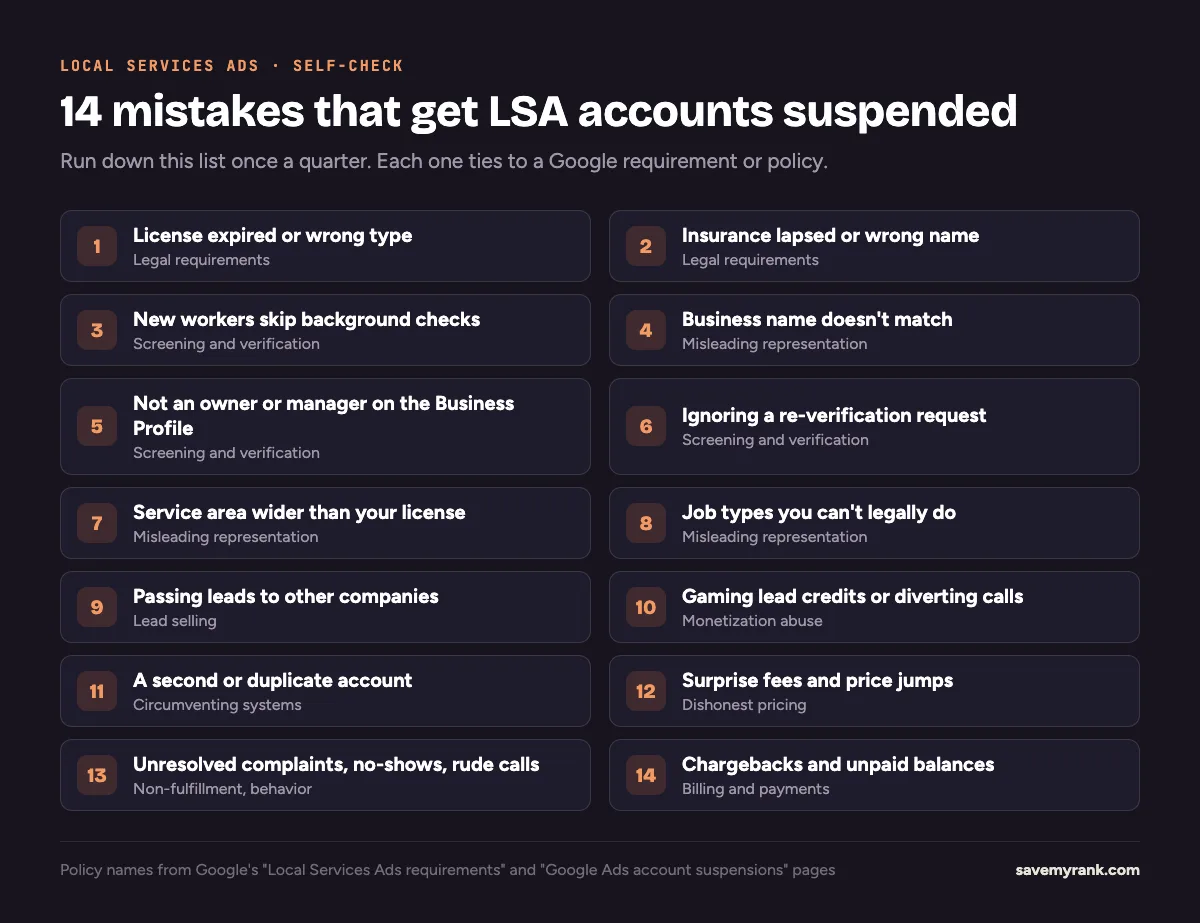
1. Letting your license expire, or holding the wrong one
- What it is: Google requires the licenses your trade needs. It checks state licenses against state databases. You also have to confirm you hold any county or city licenses.
- How to spot it: Look up your license on your state board's site. Check the expiration date and the name on it.
- The fix: Renew it, then upload the current license in your Local Services account. If you serve more than one state or area, Google wants licenses for each location.
2. Insurance that lapsed, is too low, or is in a different name
- What it is: In categories that need insurance, Google asks for a certificate of insurance.
- How to spot it: Google's upload rules say the certificate must:
- be valid for at least 14 days after you upload it
- show a policy number and, in the US and Canada, ideally a signature
- meet the coverage amount shown on your dashboard
- be in the name you advertise with
- The fix: Ask your agent for a fresh certificate before every renewal date. If the name differs, add a DBA document.
Background check and verification mistakes
3. New workers who skip the background check
- What it is: In some trades and areas, every owner and every worker who does the job at a customer's property must pass a background check. That includes contractors and subcontractors. Office staff who don't go to customers don't need one.
- How to spot it: Compare the roster in your Local Services account with who is actually going out on jobs this month.
- The fix: Add new workers to the roster and get them checked before their first job. Google doesn't charge for the check.
4. Business name that doesn't match across records
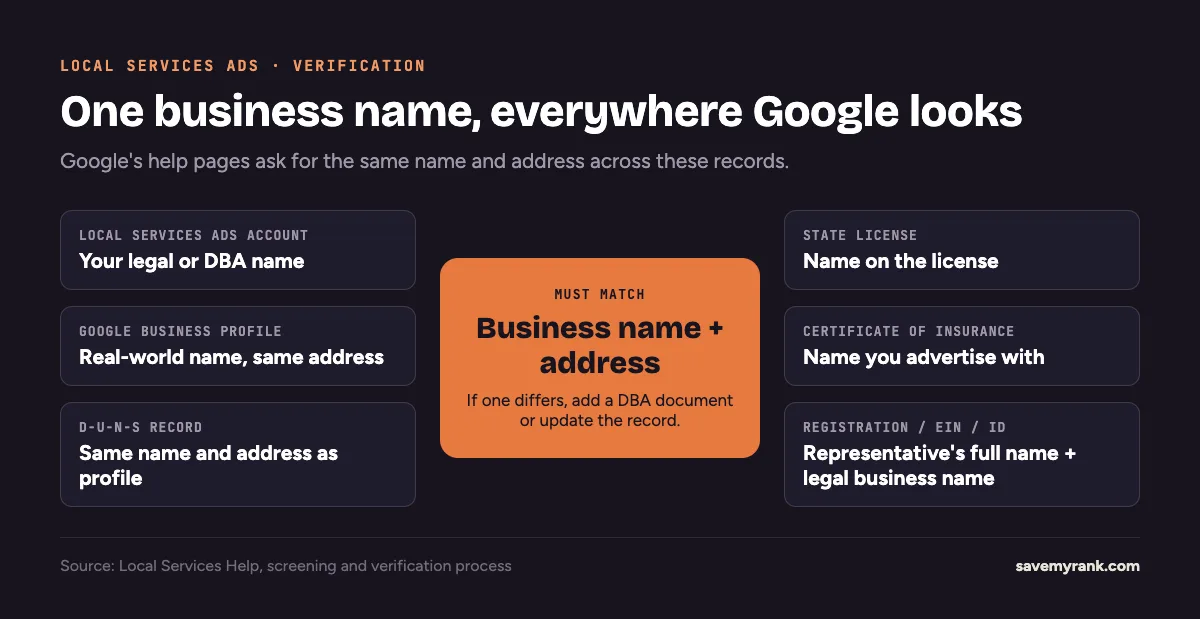
- What it is: Google's verification steps ask for the same name and address on your account, Business Profile, D-U-N-S record, license, insurance, and registration. Wrong information about your business falls under Google's "misleading representation" rule.
- How to spot it: Put all six side by side. Look for "LLC" vs no "LLC", old names, and old addresses.
- The fix: Update the record that's wrong. Use a DBA document where a name differs for a real reason. Google says to keep the D-U-N-S name and address the same as your Business Profile.
5. Not being an owner or manager on your Business Profile
- What it is: Local Services advertisers need a public, verified Google Business Profile. The person doing the checks must be an owner or manager on it.
- How to spot it: Your verification dashboard shows a "request profile access" option or an unfinished Business Profile step.
- The fix: Get added as owner or manager, or verify the profile if no one has. Google says this step can take up to 24 hours to show as done.
6. Ignoring a re-verification request
- What it is: Google re-checks advertisers over time. Some new US advertisers get the badge fast and then have 14 days to finish extra steps.
- How to spot it: Emails or dashboard notices asking for a follow-up review.
- The fix: Finish it right away. Google says skipping it can cost you the badge, pause your ads, or suspend the account.
Service area and job type mistakes
7. Service area wider than your license
- What it is: Google says if your license only covers a certain area, you can't advertise outside it.
- How to spot it: Compare the ZIP codes or cities in your ad settings with where your license is valid.
- The fix: Remove areas you aren't licensed for. Add them back only after you get the license.
8. Job types you can't legally do
- What it is: Google says you may only take work you're licensed, insured, and able to do.
- How to spot it: Read every job type turned on in your account. Ask: is each one covered by my license and policy?
- The fix: Turn off the rest. Also note that Google no longer gives lead credits for "job type not serviced" or "geo not serviced" leads, so wrong settings cost you money too.
Lead and account mistakes
9. Passing leads to other companies
- What it is: Google's lead selling rule says only you or your vetted technicians can do the jobs your ads bring in. No selling or handing off leads. No call centers that route jobs to businesses not in your ad.
- How to spot it: Any job your ads bring in that someone outside your vetted roster does.
- The fix: Stop the handoffs. Put any subcontractor who does your jobs on your roster and through the background check, or don't send them Local Services jobs.
10. Gaming lead credits or diverting calls
- What it is: Google calls this monetization abuse. Examples it lists: using a phone number as your business name, sending customers to a different number to avoid paying for a lead, and trying to trick support into crediting valid leads.
- How to spot it: Do you ask customers to call you back on another line? Do you mark real leads as bad?
- The fix: Keep calls on the tracking number in your ad. Rate leads honestly. Google now credits many poor leads on its own, usually within 30 days, per its automated lead credits page.
11. A second or duplicate account
- What it is: Google's circumventing systems rule bans duplicate accounts made to get more traffic or to get around a suspension.
- How to spot it: More than one Local Services account for the same business, or an old account an employee or past agency set up.
- The fix: Keep one account per business. If you're suspended, appeal. Don't start over. Google says new accounts may be suspended too.
Customer and billing mistakes
12. Surprise fees and price jumps
- What it is: Google's dishonest pricing rule. Its examples include quoting one price on the phone and charging more on arrival, and not disclosing trip or diagnostic fees.
- How to spot it: Reviews or complaints that mention "price changed" or "hidden fee."
- The fix: Tell customers about trip and diagnostic fees up front. Only change the price if the job is really different from what they described.
13. Unresolved complaints, no-shows, and rude calls
- What it is: Google's non-fulfillment and behavior rules. Its examples include unfinished work, damage you don't make right, and multiple complaints. Being rude to a Google support rep is on the list too.
- How to spot it: Open complaints, refund requests, and bad reviews you haven't answered.
- The fix: Resolve them and keep records. Reply to reviews in your Business Profile, which is where Google says reviews are managed. See our guide to getting more Google reviews.
14. Chargebacks and unpaid balances
- What it is: Google's suspension overview lists chargebacks, unpaid balances, and suspicious payments as reasons for suspension.
- How to spot it: A disputed Google charge with your bank, an expired card, or a past-due balance notice.
- The fix: Call Google before you dispute a charge with your bank. Keep a working card on file. Pay balances on time.
Smaller mistakes that stop leads (but usually don't suspend you)
- Photo problems. Google rejects photos with phone numbers, email or street addresses, another company's watermark, screenshots, or blurry shots.
- Restricted trades. In the US, locksmiths and garage door repair need advanced verification before ads can run.
- Fake or bought reviews. Google removes reviews that break its Maps content rules. Fewer reviews can hurt where you show, since Google says star rating and review count affect ranking.
A quarterly Local Services Ads check
- Check license and insurance expiration dates.
- Match the business name across all six records.
- Compare your worker roster with who is going to jobs.
- Read your job types and service areas against your license.
- Look for any open notices in Policy Manager or your verification dashboard.
- Confirm your card on file works and no balance is past due.
Want to compare Local Services Ads with other channels? Read Local Services Ads vs Google Ads and Google Maps advertising. For organic Maps rankings, see local SEO.
Already suspended? We can handle the appeal for you.
Key Rank Strategies recently got a suspended Local Services Ads account for a Florida home-service business reinstated on appeal. We find the cause, fix it, and write the appeal. Call (949) 810-7351 or book a call.
Book a call →We also run Local Services Ads for home-service businesses. See Local Services Ads management and Google Ads management.
Frequently asked questions
How long does a Google LSA background check take?
Google doesn't give a separate time for the background check. It says the whole screening and verification process takes about 3 to 4 weeks on average after you submit your documents. Start it as soon as you create your account.
Why am I not eligible for Google Local Services Ads?
Common reasons: your trade or area isn't supported, you didn't pass a background, license, or insurance check, or your trade is restricted. In the US, locksmiths and garage door repair need advanced verification. Your Local Services dashboard shows which checks are open.
What do Google background checks look for?
For owners and field workers, Google says the check covers identity and criminal history, including national sex offender, terrorist, and sanctions registries in the US. For the company, it covers civil litigation history like judgments and liens. It doesn't include a credit check.
What causes a red flag on a Local Services Ads background check?
Google doesn't publish a list of disqualifying results. It says results stay confidential between the business and the background check partner. If you think a result is wrong, contact that partner to correct it.
What disqualifies you from passing the LSA background check?
Google doesn't publish specific disqualifiers. Questions about what was checked, the time period covered, and appeals go to the background check partner, not Google.
Can you fail the background check and still advertise on Local Services Ads?
Not in the program you applied to. Google says you can fix errors with the background check partner. After a final denial, you can reapply in 30 days. If the second application is denied, you wait 180 days before each later try.
Do I need a Google Business Profile for Local Services Ads?
Yes. Google says Local Services advertisers must have a public, verified Business Profile, and the person completing the checks must be an owner or manager on it.
Is Google Guaranteed still a thing?
No. Google replaced the Google Guaranteed and Google Screened badges with one Google Verified badge and ended the Money Back Guarantee. The screening checks behind the badge still apply.
Will Google warn me before suspending my account?
Sometimes. For repeat Google Ads policy violations, Google says it sends a warning at least 7 days before suspension. For egregious violations, it suspends right away without warning.