If Google suspended your Local Services Ads account, you can appeal. Find the exact policy in Policy Manager, fix that problem first, then send one short appeal with proof. Don't open a new account in the meantime.
1) Read Google's suspension email and open Policy Manager in your Local Services Ads account to see which policy you broke. 2) Fix that problem: license, insurance, business name, job types, service area, billing, or workers. 3) Gather documents that match your business name. 4) Use the appeal option under that policy in Policy Manager. 5) Send one appeal and wait for Google's email. Don't create a second account.
First, check: suspended, paused, or disapproved?
These are three different problems, and each has a different fix. Google's help pages describe them this way:
- Suspended account. None of your ads can run and you can't create new content. You can still sign in and see your reports. Google sends an email and shows a notice in your account.
- Disapproved ad. One ad or one service category is blocked, not the whole account. You fix the issue and Google reviews the ad again on its own.
- Paused ads. Google re-checks advertisers from time to time. If it asks you to finish a follow-up review and you don't, you can lose your badge, have your ads paused, or get suspended.
Used to have the Google Guaranteed or Google Screened badge? Google replaced both with one Google Verified badge. The suspension and appeal steps are the same.
Not sure which one you have? Open Policy Manager. Google's own page on fixing a disapproved Local Services ad says to check there first.
Why Google suspends Local Services Ads accounts
Google says accounts get suspended for breaking its Local Services Ads requirements, the Local Services terms, or Google Ads policies. One serious violation can do it. So can several smaller ones. Here is what those rules cover, in plain words:
- Legal requirements: you must hold the licenses and insurance your work requires.
- Misleading representation: wrong info about your name, licenses, insurance, service area, job types, or prices. Advertising outside the area your license covers counts.
- Lead selling: passing or selling leads to another company, or running a call center that sends jobs to businesses not shown in your ad.
- Circumventing systems: duplicate accounts, false info in verification, or making a new account after a suspension.
- Monetization abuse: trying to avoid paying for leads, like sending customers to a different phone number or tricking support into crediting valid leads.
- Dishonest pricing: low quotes that turn into big bills, or trip fees you didn't tell the customer about.
- Non-fulfillment: taking payment and not finishing the job, or not fixing damage you caused.
- Inappropriate behavior: threats or harassment toward customers. Google's examples even include being rude to a Google support rep.
- Billing problems: Google's account suspension overview lists chargebacks, unpaid balances, and suspicious payments.
We break each one down with fixes in 14 Local Services Ads mistakes that get accounts suspended.
How to find the exact reason
- Find the suspension email from Google. It names the policy.
- Sign in to your Local Services Ads account.
- Open the menu and go to Policy Manager.
- Find the policy listed as violated. Click Read the policy.
- Write down the policy name and the date. You'll use both in your appeal.
Google's page About Local Services Ads account suspensions also points you to Policy Manager to check your status and next steps.
If the policy name is vague, look at what changed right before the suspension. Things to check: a new business name, a lapsed insurance policy, a new technician, a bank chargeback, or a new service area.
How to appeal a Local Services Ads suspension, step by step
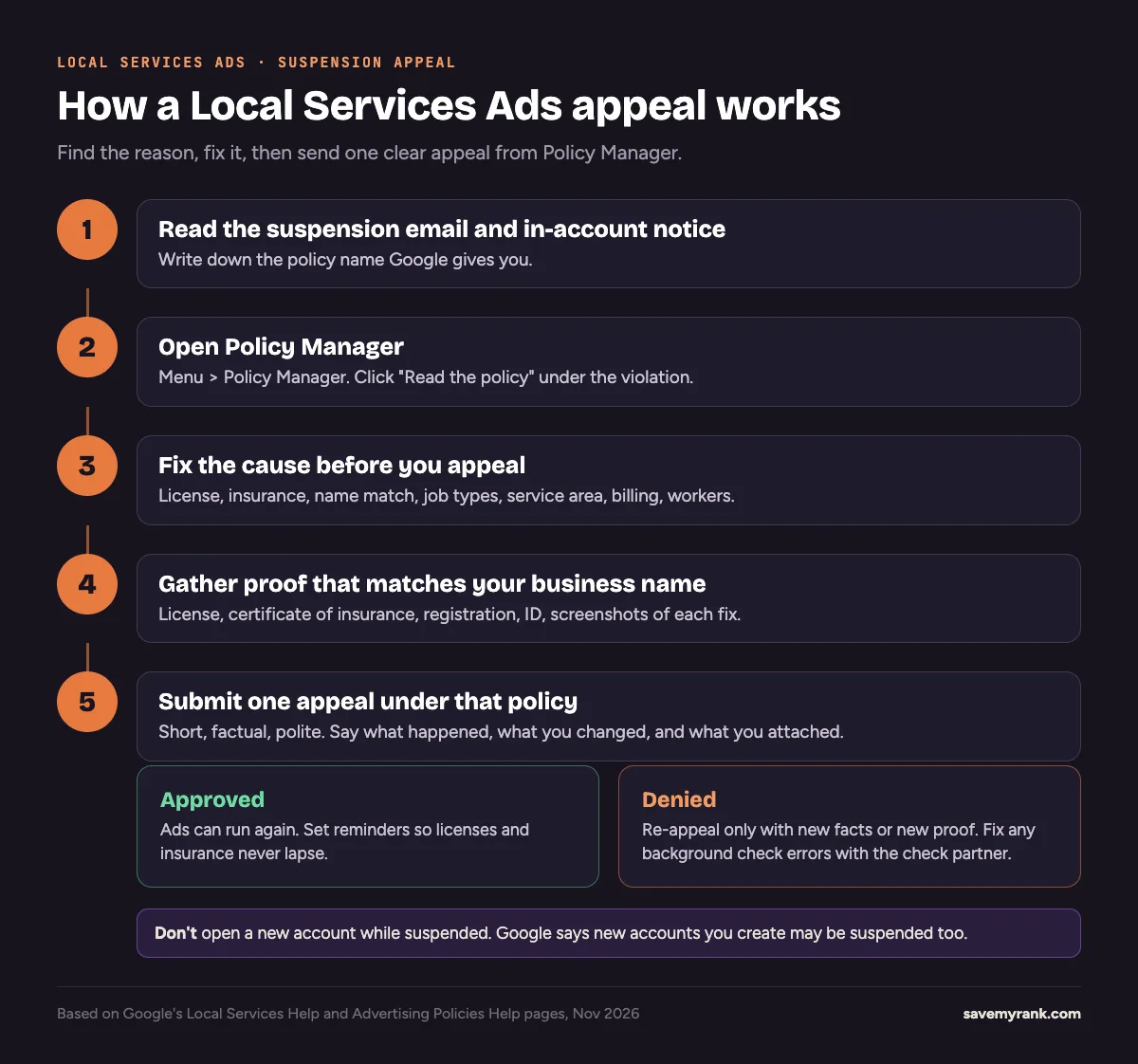
- Stop and don't make a new account. Google says other accounts tied to you may be suspended, and new accounts you create may be suspended too.
- Fix the cause first. Renew the license, upload current insurance, match your business name, trim job types or service areas, pay the balance, or get new workers through the background check.
- Gather proof. Use the checklist in the next section.
- Open Policy Manager. Google says to use the appeal option under the policy that was violated.
- Write a short appeal. Use the template below. Facts only.
- Finish any verification Google asks for. Google says some advertisers must pass advertiser verification before they can appeal. If Google can't verify your identity after 3 attempts, you can't appeal.
- Submit once and wait. Google sends the decision by email. Google warns that it may not process extra appeals for the same suspension, and may pause appeals for 7 days if it sees misuse.
Only a disapproved ad, not a suspended account? In Policy Manager, choose Contact us to fix this and fill out the form. Google re-reviews the ad once the issue is fixed.
Documents to prepare
Google checks different things depending on your trade and state. Your Local Services dashboard shows what applies to you. These come from Google's screening and verification help page:
- Business license at the state level, and an owner license if your trade needs one. Google checks licenses against state databases.
- Certificate of insurance. It must be signed, show a policy number, meet the amount shown on your dashboard, and be valid for at least 14 days after you upload it.
- Business registration: a D-U-N-S number, or a Secretary of State filing, IRS EIN letter, or Department of Revenue registration.
- Government photo ID for the business representative. Clear and not expired.
- DBA document if your license or insurance shows a different name than you advertise with.
- A list of field workers for background checks, if your category requires them.
- Proof of each fix (our tip): screenshots of updated settings, dated receipts, refund records.
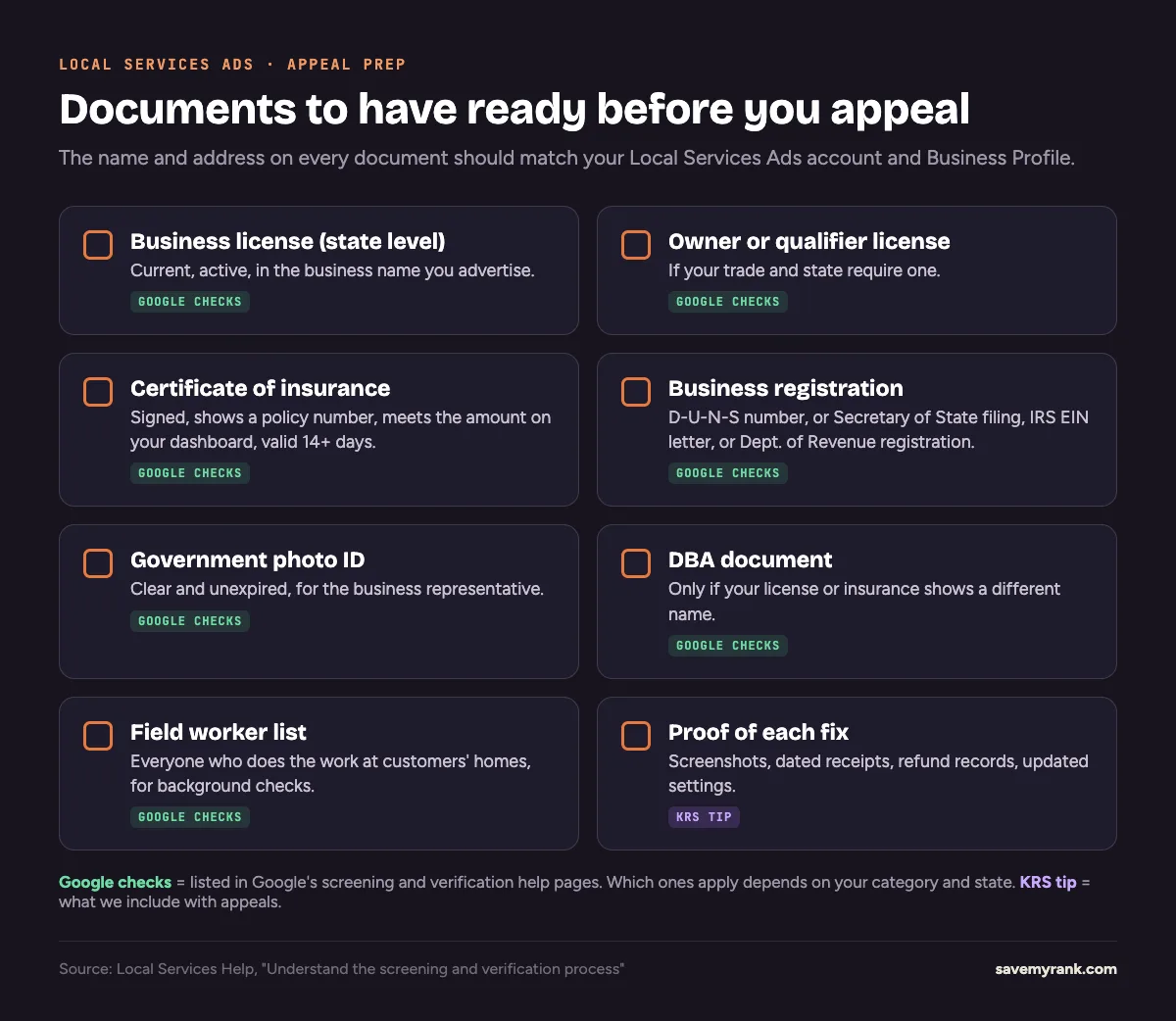
Google says the representative's full name and the legal business name should match exactly across your documents. A name mismatch is easy to fix once you spot it.
What to write in your appeal (template)
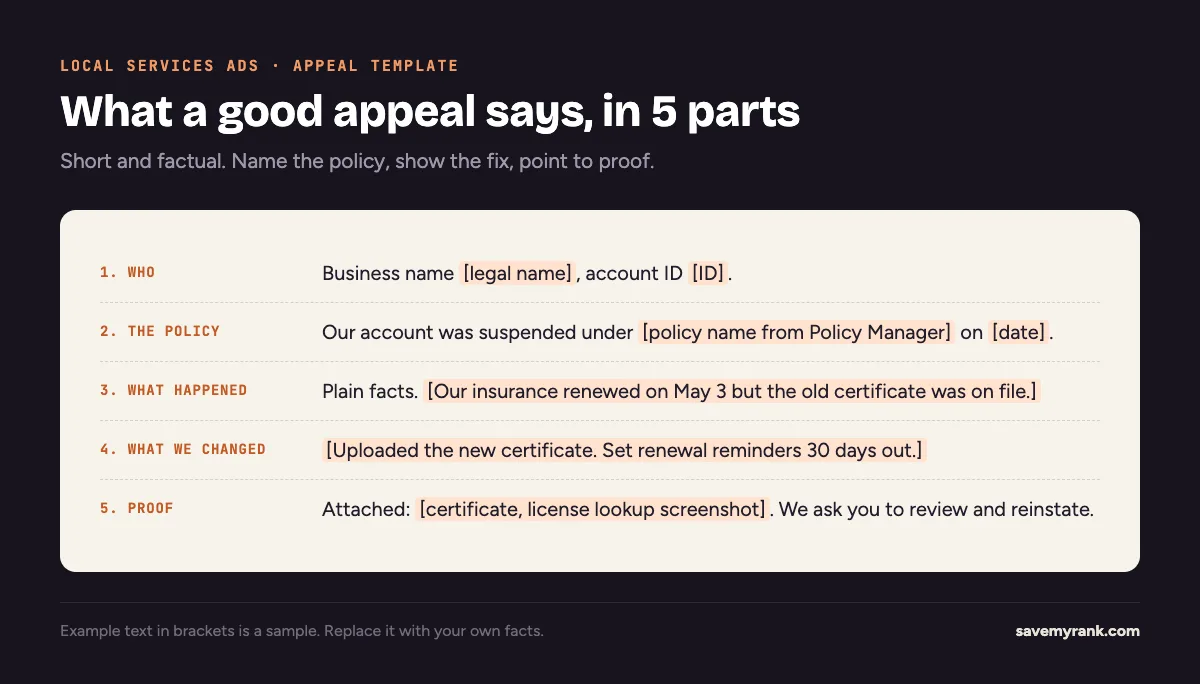
Keep it short. A reviewer should understand it in under a minute. Google asks you to be "thorough, accurate, and honest" and to explain your situation for each policy.
Business: [legal business name]. Account ID: [ID].
Our account was suspended on [date] under [policy name from Policy Manager].
What happened: [one or two plain sentences of fact].
What we changed: [each fix, with the date you made it].
Attached: [list each document or screenshot].
We've corrected the issue and ask you to review our account for reinstatement. Thank you.
Don't:
- Blame Google or a competitor.
- Promise to fix things later. Fix them first.
- Paste a long story. Facts and proof win.
- Send the same appeal over and over.
How long does an appeal take?
Google doesn't publish a set time for Local Services Ads appeals. You'll get the result by email. Here are the timelines Google does publish that can affect you:
- Screening and verification: about 3 to 4 weeks on average after you submit documents.
- New D-U-N-S number: can take up to 30 days from Dun & Bradstreet.
- Business Profile link step: can take up to 24 hours to show as done.
- Failed background check: wait 30 days after a final decision to reapply. If the second try is also denied, wait 180 days.
- Too many appeals: Google may stop processing your appeals for 7 days.
Plan for weeks, not days. Keep other lead sources running in the meantime, like local SEO or Google Maps ads.
What to do if Google denies your appeal
- Read the denial email. Does it name a different or second policy? Fix that one too.
- Appeal again only with something new. Google says you can re-appeal through the same process. A new document or a new fix gives the reviewer a reason to change the answer.
- Background check problem? Results stay between you and Google's background check partner. Contact that partner to fix errors. Google says the business or its workers can always do this.
- Egregious violation? For the most serious violations, Google says you won't be allowed to advertise again. Ask for a second opinion before you spend more time.
- Get help. Someone who has done appeals before can often spot the mismatch you missed.
How to reach Local Services Ads support
Google's Contact Local Services Ads support page lists these options for the US and Canada:
- New to Local Services Ads or still onboarding: call 1-877-824-3983, Monday to Friday, 9 a.m. to 8 p.m. Eastern.
- Live account with the Google Verified badge: use the online support form. Same hours.
- Consumer issues: online form only. No phone support.
Stay calm on the call. Google lists rude behavior toward its support reps as a policy violation.
How to keep it from happening again
- Calendar every expiration date. License, insurance, and workers' certifications. Set reminders 30 days out.
- Use one business name everywhere. Local Services Ads, your verified Business Profile, license, insurance, D-U-N-S.
- Run new hires through the background check before they go to a customer's home.
- Answer re-verification requests fast. Google re-checks advertisers and can pause ads if you don't respond.
- Only pick job types and areas you're licensed for.
- Never pass a lead to another company.
- Keep billing clean. Call Google before you dispute a charge with your bank.
- Keep one account per business.
Want the bigger picture on where Local Services Ads fit? Read Local Services Ads vs Google Ads.
Suspended? We can handle the appeal for you.
Key Rank Strategies recently got a suspended Local Services Ads account for a Florida home-service business reinstated on appeal. We find the real cause, fix it, line up the documents, and write the appeal. Call (949) 810-7351 or book a call.
Book a call →We also manage Local Services Ads day to day. See Local Services Ads management and Google Ads management.
Frequently asked questions
Can I just create a new Local Services Ads account?
No. Google says Local Services accounts related to a suspended account may be suspended, and any new accounts you try to create may be suspended too. Creating a new account after a suspension also breaks Google's circumventing systems rule. Appeal the original account instead.
How long does a Local Services Ads appeal take?
Google doesn't publish a set time for Local Services Ads appeals. You'll get the decision by email. If your fix needs new verification, Google says screening takes about 3 to 4 weeks on average after you submit documents.
How many times can I appeal?
Google says you can re-appeal if your appeal is rejected. It also says it may not process too many appeals for the same suspension, and may pause appeals for 7 days if it sees misuse. Send one complete appeal, and only appeal again with new facts or proof.
Can I still see my leads and reports while suspended?
Yes. Google says suspended accounts can't run ads or create new content, but advertisers can still access the account and its reports.
Does Google have a 1-800 number for Local Services Ads?
For the US and Canada, Google lists 1-877-824-3983 for businesses that are new to Local Services Ads or still onboarding, Monday to Friday, 9 a.m. to 8 p.m. Eastern. Live accounts with the Google Verified badge use an online form during the same hours.
How do I speak to a person at Google about Local Services Ads?
Call 1-877-824-3983 if you're onboarding, or use the support form on Google's Contact Local Services Ads support page if your account is live. Have your account ID and the policy name from Policy Manager ready.
How can I contact Google Ads support about a suspended Local Services account?
Start in Policy Manager inside your Local Services Ads account and use the appeal option under the policy that was violated. For other help, use Google's Contact Local Services Ads support page, which lists the phone number and form.
Does Google offer 24/7 customer service for Local Services Ads?
No. Google lists Local Services Ads support hours for the US and Canada as Monday to Friday, 9 a.m. to 8 p.m. Eastern.
Do you have to pay for Google Local Services Ads?
Yes. Local Services Ads charge for leads, such as calls and messages, not for clicks. Google says leads it finds invalid or low quality aren't charged, and some charged leads are credited later.
What happened to Google Local Services Ads?
They still run. Google replaced the Google Guaranteed and Google Screened badges with one Google Verified badge and ended the Google Money Back Guarantee. Eligible existing advertisers got the new badge with no action needed.
Is there a difference between Google Ads and Google Local Services Ads?
Yes. Local Services Ads are pay-per-lead ads for verified businesses that show your reviews and badge. Google Ads search campaigns are pay-per-click and use keywords. Read our Local Services Ads vs Google Ads guide for the full comparison.
What if I failed the Local Services Ads background check?
Google says businesses that fail aren't eligible for that program. Contact the background check partner to fix any errors. After a final denial, wait 30 days to reapply. If a second application is denied, wait 180 days.